Sharp MX-M232D Dokumentacja Strona 116
- Strona / 148
- Spis treści
- BOOKMARKI

- MX-M182 1
- MX-M182D 1
- MX-M202D 1
- MX-M232D 1
- Out put power : Max. 0.3mW 2
- CONTENTS 3
- [1] GENERAL 4
- [2] CONFIGURATION 6
- [3] SPECIFICATIONS 8
- (2) Feedable paper 9
- (3)Types of feedable paper 9
- (1) Platform 11
- (2) Support OS 11
- (3) Printer driver function 11
- (1) Mode 15
- (3) Image Processing 15
- (5) Pull Scan (TWAIN) 16
- [4] CONSUMABLE PARTS 18
- 2. Environmental conditions 19
- 1. Appearance 21
- 2. Internal 22
- 3. Operation Section 23
- 4. Motor, solenoid, clutch 24
- 5. Sensor, switch 25
- 6. PWB unit 26
- 7. Cross sectional view 27
- [6] ADJUSTMENTS 28
- B. Mechanism section 29
- A4(8.5" x 11") 31
- Paper rear edge 31
- Wire fixing screw 32
- Rear side 33
- Front side 33
- Paper exit 34
- Original guide 35
- Copy paper 35
- (A3 or 17" x 11") 35
- C. Image density adjustment 36
- [7] SIMULATIONS 37
- 4. Contents of simulations 39
- : Simulation cancel 50
- : Sub code input window 50
- [OK] key or 52
- [START] key 52
- [OK] key 71
- After input 71
- YY: Inputted adjustment value 71
- [BACK] key 73
- Sim61-2 LASER PWR 86
- 1:LASER POWER 86
- [ 0 - 1] 86
- 3sec later 87
- 1sec later 88
- [8] TROUBLE CODE LIST 97
- 3.Communication result code 102
- [9] MAINTENANCE 105
- 2. Maintenance display system 106
- [10] DISASSEMBLY AND ASSEMBLY 107
- 2. Optical section 108
- E. Lens unit 109
- 3. Fusing section 110
- B. Thermostat 111
- C. Thermistor 111
- D. Heater lamp 111
- E. Upper heat roller 112
- F. Separation pawl 112
- G. Lower heat roller 112
- 4. Paper exit section 113
- (A) Simplex 114
- (B) Duplex sensor 114
- E. Transport roller 115
- F. Paper exit roller 115
- G. Paper exit interface PWB 115
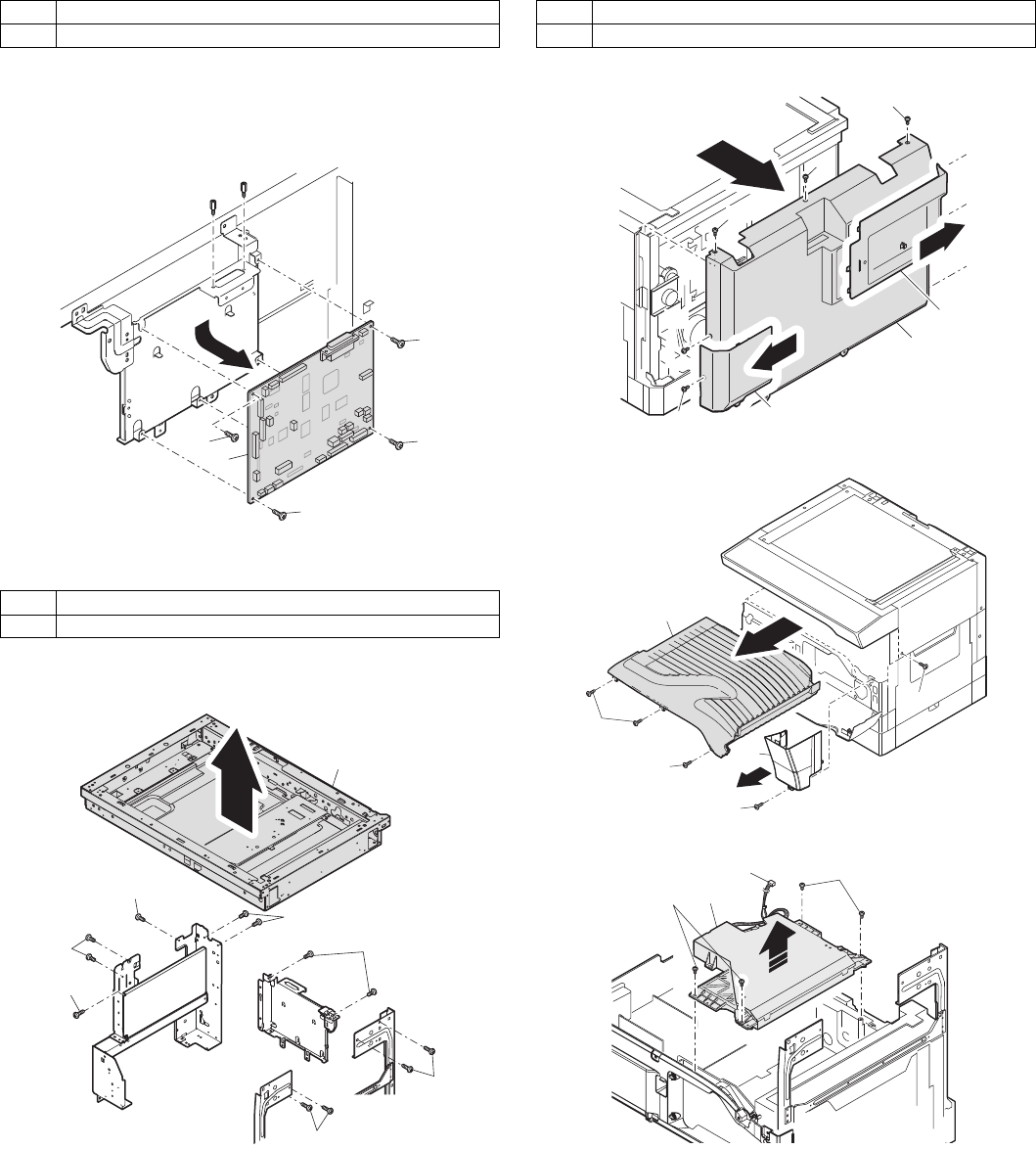
- 6. Optical frame unit 116
- (G-484) 117
- 9. Bypass tray section 118
- F. Pressure plate unit 119
- 10.Power section 120
- 11.Developing section 121
- 12.Process section 122
- 13.Others 123
- D. 2nd tray transport clutch 124
- E. 2nd tray transport roller 124
- F. 2nd tray paper feed clutch 124
- G. Main motor 124
- H. Paper entry sensor 125
- I. Paper empty sensor 125
- [11] OPERATIONAL DESCRIPTIONS 126
- 1. Preparation 127
- 2. Download procedure 127
- A. Preparation 131
- B. Updating procedures 131
- 6. Installation procedure 132
- D:\Sirius 133
- IP ADDRESS SETT 134
- IP ADDRESS 134
- 0 0 0 0 134
- [14] ELECTRICAL SECTION 135
- 2.Actual wiring diagram 136
- OPTICAL UNIT 137
- ACTUAL WIRING DIAGRAM 3/8 138
- FUSING UNIT 139
- SPF interface PWB 140
- ACTUAL WIRING DIAGRAM 6/8 141
- ACTUAL WIRING DIAGRAM 7/8 142
- ACTUAL WIRING DIAGRAM 8/8 143
- (2) NOTE FOR SOLDERING WORK 146
- CAUTION FOR BATTERY DISPOSAL 147
- Trademark acknowledgements 148
Powiązane produkty i podręczniki dla Kopiarki Sharp MX-M232D
 (173 strony)
 (102 strony)
(12 strony)
(30 strony)
(184 strony)
(92 strony)
(102 strony)
(12 strony)
(30 strony)
(184 strony)
(92 strony)


 (112 strony)
(52 strony)
(67 strony)
(109 strony)
(28 strony)
(91 strony)
(84 strony)
(120 strony)
(56 strony)
(160 strony)
(112 strony)
(52 strony)
(67 strony)
(109 strony)
(28 strony)
(91 strony)
(84 strony)
(120 strony)
(56 strony)
(160 strony)
© 2020, manymanuals.pl. Wszelkie prawa zastrzeżone. | 0.035 s |
 Manymanuals.com
 Manymanuals.de
 Manymanuals.fr
 Manymanuals.it
 Manymanuals.pl
 Manymanuals.cz
 Manymanuals.es
 Manymanuals-pt.com
Komentarze do niniejszej Instrukcji