Sharp PC-9300 Dokumentacja Strona 112
- Strona / 160
- Spis treści
- BOOKMARKI

- Windows CE Mobile Compute 1
- IMPORTANT NOTICES 3
- RELEASE NOTES 5
- CONTENTS 6
- INTRODUCTION 10
- Introduction 12
- QUICK START 14
- INSERTING MEMORY CARD 15
- CONNECTING HEADSET 15
- REMOVING HAND STRAP 16
- INSTALLING BATTERY 17
- Quick Start 18
- USING CABLE 20
- USING CRADLE 21
- Chapter 1 22
- Chapter 1 24
- Using 9300 Mobile Computer 24
- 1.3 KEYPAD 27
- 1.3.1 KEYPAD SETTINGS 29
- 1.3.2 ALPHA KEY 29
- 1.3.3 SPECIAL KEY 29
- 1.4 TOUCH SCREEN 31
- 1.6 BARCODE READER 34
- 1.7 CRADLES 35
- 1.7.2 ETHERNET CRADLE 36
- 1.8 BATTERY CHARGER 37
- Chapter 2 38
- 2.1 GETTING STARTED 39
- 2.1.1 SUSPEND MODE 39
- 2.1.2 DESKTOP 40
- Chapter 2 42
- Learning Windows CE Basics 42
- 2.1.4 START MENU 43
- Control Panel 43
- Taskbar and Start Menu 43
- 2.1.5 INPUT METHODS 44
- 2.2.3 EXIT A PROGRAM 46
- 2.3 USING ACTIVESYNC 47
- 2.3.2 ADD/REMOVE PROGRAMS 48
- 2.3.3 EXPLORE DEVICE 49
- 2.3.4 BACKUP/RESTORE 50
- 2.4 USING WINDOWS EXPLORER 51
- 2.4.2 CREATE A NEW FOLDER 51
- 2010/1/1 00:00 53
- Chapter 3 56
- 3.2.1 CHANGING DEVICE NAME 57
- 29-key, QVGA screen 58
- 3.3 SYSTEM SETTINGS 59
- 3.5 UPGRADING OS IMAGE 64
- 3.5.1 OS VERSION 64
- 3.5.2 SD UPDATE 65
- 3.5.3 USB UPDATE 66
- Chapter 4 68
- 4.2 SUMMIT CLIENT UTILITY 69
- 4.2.1 MAIN SETTINGS 69
- Chapter 4 Usin 70
- 802.11 Radio 70
- Auto Profile & List 71
- Import/Export 72
- 4.2.2 PROFILE EDITING 73
- Edit Profile 75
- Radio Configuration 75
- EAP Type & Credentials 77
- 4.2.4 DIAGNOSTICS 79
- Chapter 5 86
- 5.1 TURN ON BLUETOOTH POWER 87
- 5.1.2 BLUETOOTH TOOLBAR 88
- 5.1.3 SET DISCOVERABLE 89
- 5.2 SEARCH DEVICES 90
- 5.3 PAIR DEVICES 91
- 5.3.1 IDENTIFY REMOTE DEVICE 91
- 5.3.2 PAIR 92
- 5.3.3 UNPAIR 95
- 5.4 FILE TRANSFER 96
- 5.4.1 UPLOAD A FILE 96
- 5.4.2 DOWNLOAD A FILE 97
- 5.5 OBJECT PUSH 98
- 5.6 SERIAL PORT SERVICE 99
- 5.6.1 SERIAL PORT SERVICE 99
- Chapter 5 Using Bluetooth 100
- 5.6.2 BLUETOOTH ACTIVESYNC 101
- 5.7 MANAGE LOCAL SERVICES 103
- 5.7.1 FILE TRANSFER 103
- 5.7.2 OBJECT PUSH 104
- 5.7.3 SERIAL PORT SERVICE 105
- Chapter 6 106
- 9300 Mobile Computer 107
- Reference Manual 107
- Chapter 6 108
- 0 = Disable the vibrator 111
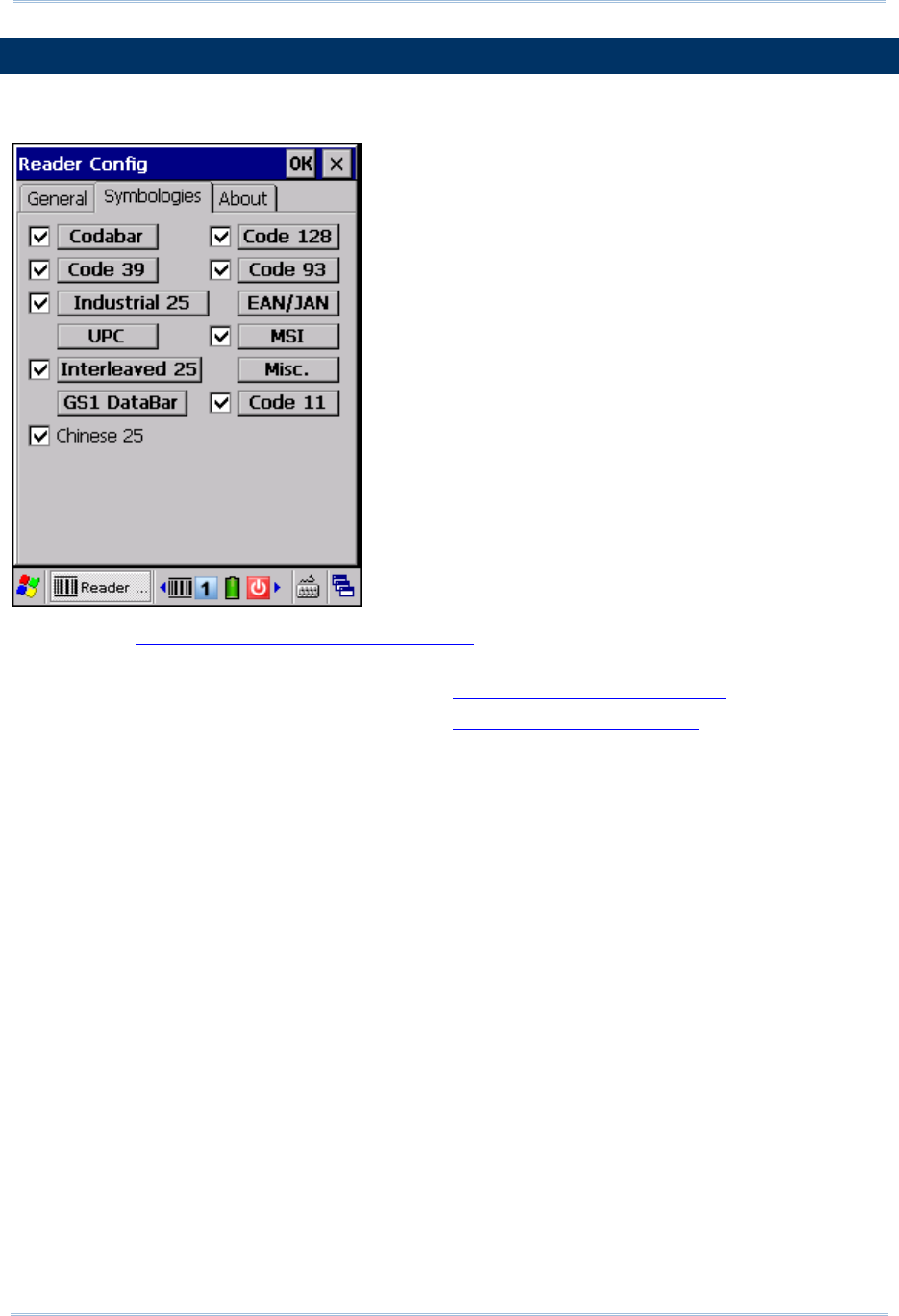
- 6.5 SYMBOLOGY SETTINGS 112
- Chapter 7 114
- 7.1.1 MANAGING THE REGISTRY 115
- 7.1.2 PREPARING FOR BACKUP 116
- 7.1.3 BACKING UP FILES 117
- File Manipulation 119
- Auto Restore 119
- Manual Restore 119
- Enter 121
- Scan 121
- Esc 121
- Delete 121
- 7.3 SCREEN CONTROL 124
- SPECIFICATIONS 126
- ELECTRICAL CHARACTERISTICS 127
- PHYSICAL CHARACTERISTICS 127
- Specifications 128
- Accessory Options 129
- Appendix I 130
- Appendix II 132
- Appendix II Laser (SE955) 134
- Code Character Code Type 137
- Appendix III 140
- Security Level 1 – 141
- Security Level 2 – 141
- Security Level 3 – 141
- Appendix III 2D Imager 142
- 135 144
- Check Digit Algorithm 144
- Convert to EAN-13 145
- Convert to UPC-A 145
- 137 146
- UPC Never Linked 147
- UPC Always Linked 147
- 2D SYMBOLOGIES 148
- Appendix IV 156
- 43-KEY KEYPAD 158
- 151 160
Powiązane produkty i podręczniki dla Notatniki Sharp PC-9300

 (37 strony)
(80 strony)
(37 strony)
(80 strony)
 (100 strony)
(103 strony)
(60 strony)
(271 strony)
(32 strony)
(83 strony)
(68 strony)
(68 strony)
(114 strony)
(125 strony)
(68 strony)
(100 strony)
(103 strony)
(60 strony)
(271 strony)
(32 strony)
(83 strony)
(68 strony)
(68 strony)
(114 strony)
(125 strony)
(68 strony)
 (160 strony)
 (33 strony)
(82 strony)
(68 strony)
(33 strony)
(82 strony)
(68 strony)
© 2020, manymanuals.pl. Wszelkie prawa zastrzeżone. | 0.017 s |
 Manymanuals.com
 Manymanuals.de
 Manymanuals.fr
 Manymanuals.it
 Manymanuals.pl
 Manymanuals.cz
 Manymanuals.es
 Manymanuals-pt.com
Komentarze do niniejszej Instrukcji