Sharp MX-M620U Dokumentacja Strona 184
- Strona / 200
- Spis treści
- ROZWIĄZYWANIE PROBLEMÓW
- BOOKMARKI

- PART 1: GENERAL INFORMATION 1
- PART 2: COPIER OPERATION 1
- Trademark acknowledgments 3
- Part 1: General Information 5
- OPERATION MANUALS 7
- INSTALLATION REQUIREMENTS 8
- CAUTIONS 9
- Laser Information 10
- CONTENTS 11
- CHAPTER 1 13
- INTRODUCTION 14
- See page 1-7 15
- Original Copy 16
- 2010/APR/4 18
- See page 3-4 19
- Non-Offset mode 19
- Energy saving features 21
- PART NAMES AND FUNCTIONS 22
- Interior 23
- ■ Other optional equipment 24
- Operation panel 25
- Touch panel 26
- "JOB QUEUE" screen 27
- "COMPLETE" 27
- TURNING THE POWER ON AND OFF 29
- AUDITING MODE 30
- CHAPTER 2 31
- LOADING PAPER 32
- Tray 1 Tray 2 33
- Paper guide 33
- Loading paper in paper tray 3 35
- Front side 36
- ■ Specifications 37
- ■ Part names 38
- ■ Loading paper in the AR-LC7 39
- Label facing down 41
- ■ User type 45
- DISABLE DUPLEX 46
- DISABLE PUNCH 46
- Trays 3 and the bypass tray 47
- Inserter (option) 47
- T 12-HOUR 49
- About the settings 50
- STORAGE OF SUPPLIES 52
- MISFEED REMOVAL 53
- Remove the duplex unit 54
- Gently close the duplex unit 54
- Misfeed in the duplex unit 55
- Roller rotating knob A 56
- ■ Misfeed in paper tray 3 57
- ■ Misfeed in the tray 4 57
- ■ Misfeed in the bypass tray 58
- REMOVING AN ORIGINAL MISFEED 61
- CHAPTER 3 65
- Part names 66
- Specifications 66
- ■ Supplies 67
- Non-offset mode 68
- Staple sort 69
- Stapling area 73
- Jammed staples 74
- Removing a misfeed 75
- INSERTER 78
- Loading paper 79
- ■ Alarm display 80
- ■ Using the inserter 80
- Misfeed removal 81
- SHARP OSA 83
- APPLICATION COMMUNICATION 83
- MODULE (MX-AMX2) 83
- Operation in OSA mode 84
- ■ External count mode 85
- If login fails 85
- Part 2: Copier Operation 87
- CHAPTER 4 89
- AUTOMATIC DOCUMENT FEEDER 90
- PLACING ORIGINALS 91
- Face down 92
- CHECKING THE SIZE OF A PLACED 93
- ORIGINAL 93
- STORING, DELETING, AND USING 94
- ORIGINAL SIZES 94
- NORMAL COPYING 95
- Document glass scale 99
- 2-SIDED COPY 100
- SPECIAL MODES 101
- ADJUSTING THE EXPOSURE 102
- REDUCTION/ENLARGEMENT/ZOOM 103
- PAPER SELECT 104
- COPY RATIO 104
- Original 106
- SPECIAL PAPERS 108
- CHAPTER 5 109
- Margin shift 111
- CANCEL OK 112
- Dual page copy 113
- Pamphlet copy 114
- AUTO 11x17 115
- Job build 116
- Touch the [CHANGE] key 117
- [START] key 117
- Touch the [READ-END] key 117
- Tandem copy 118
- Press the [START] key 119
- Covers/inserts 120
- COVERS/INSERTS 121
- TRANSPARENCY 121
- TAB COPYBOOK COPY 121
- (X) (Y) (Z) 123
- AMEND THE INSERTION? 124
- CANCEL DELETE AMEND 124
- Multi shot 132
- Originals 134
- Tab copy 135
- (0 5/8) 136
- Card shot 137
- SIZE RESET 138
- ECIAL MODES 139
- • Date print (page 5-35) 140
- • Page numbering (page 5-37) 140
- • Stamp (page 5-36) 140
- • Text (page 5-41) 140
- PRINT MENU 141
- 2-SIDED ORIGINAL TYPE 142
- ■ Printing the date on copies 143
- NUMBERING 144
- Print settings Front 146
- 7-29. When 149
- Storing text sequences 150
- SELECTED ITEM? 151
- DELETE MOVE 151
- STORING, USING AND DELETING 152
- JOB PROGRAMS 152
- Calling up a job program 153
- Deleting a stored job program 153
- INTERRUPTING A COPY RUN 154
- CHAPTER 6 155
- USER MAINTENANCE 156
- TROUBLESHOOTING 157
- CHAPTER 7 159
- OVERVIEW 160
- ■ Quick File folder 161
- ■ Main folder 161
- ■ Custom folder 161
- ■ Attributes of saved files 161
- A look at the operation panel 162
- Saving files 162
- Document filing icons 163
- SAVING A DOCUMENT IMAGE FILE 164
- QUICK FILE 164
- PASSWORD 166
- Print jobs 167
- Scan Save 168
- HALF TONE 169
- Touch the [SPECIAL MODES] 170
- CALLING UP AND USING A FILE 171
- USER NAME 172
- FILE OR FOLDER NAME 172
- UVWXYZOPQRSTJKLMNEFGHIABCD 173
- FILE SELECTION SCREEN 174
- ■ [Print] 175
- ■ Batch printing 176
- Touch the [OK] key 177
- DATA] key 177
- ■ [Send] 178
- ■ [Property change] 179
- JOB SETTINGS / MOVE 180
- Basic specifications 180
- Yamada Taro A4 180
- AGE SEND 181
- JOB STATUS 181
- SETTINGS 181
- SYSTEM SETTINGS 182
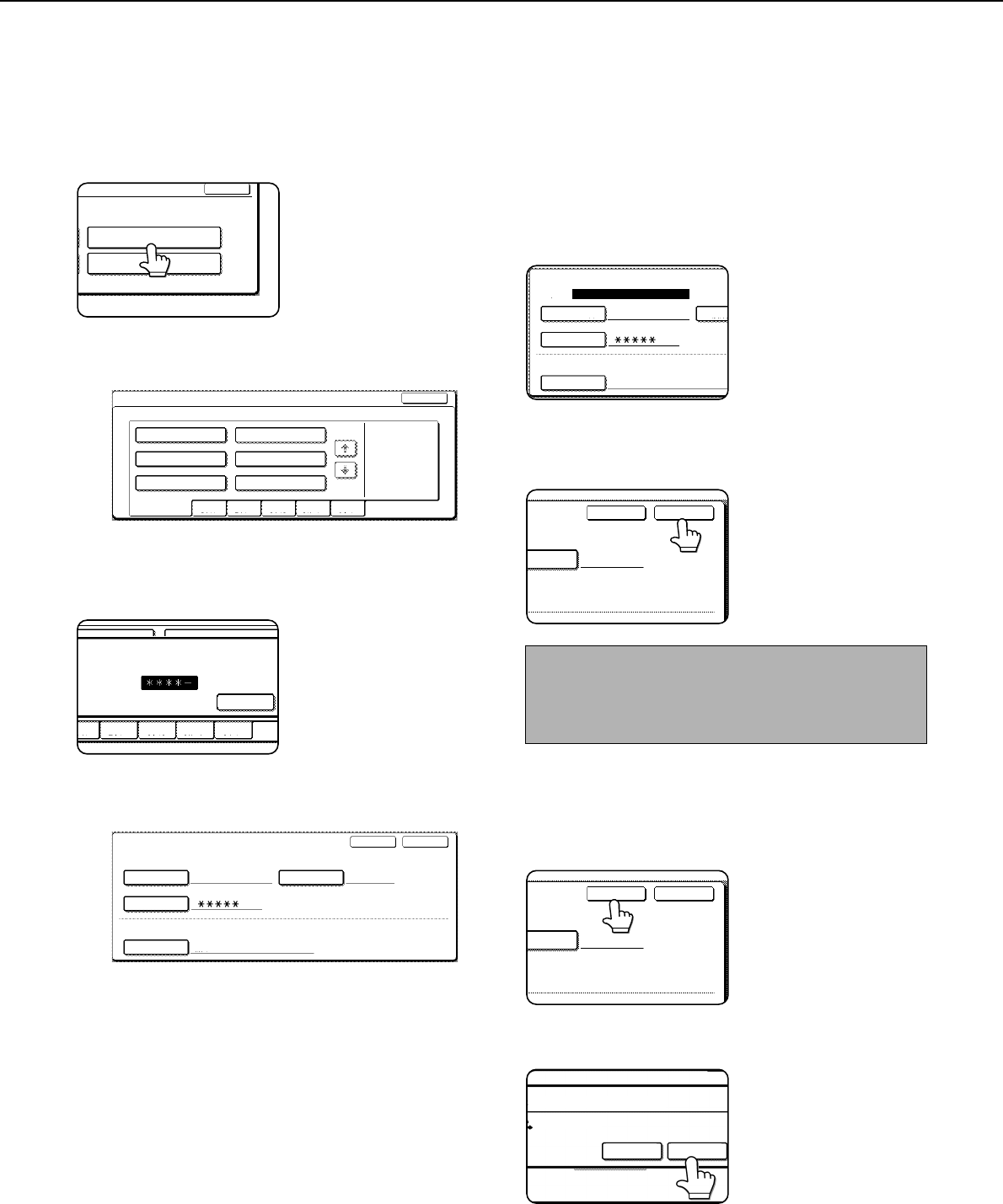
- ■ Programming a user name 183
- DELETE THE USER NAME? 184
- ■ Creating a custom folder 185
- DELETE THE FOLDER? 186
- USER FOLDER 1 186
- ENTERING CHARACTERS 187
- \?/"; : 188
- <> ! * 188
- CHAPTER 8 191
- SPECIFICATIONS 192
- LwA 7.3B 5.0B 193
- SHARP ELECTRONICS CORPORATION 200
Powiązane produkty i podręczniki dla Kopiarki Sharp MX-M620U
 (12 strony)
(56 strony)
(208 strony)
(19 strony)
(68 strony)
 (32 strony)
(95 strony)
(31 strony)
(43 strony)
(80 strony)
(82 strony)
(42 strony)
(42 strony)
(149 strony)
(80 strony)
(88 strony)
(56 strony)
(174 strony)

 (105 strony)
Whirlpool DFG 050 (AG) manuales
Manuales del propietario y guías del usuario para No Whirlpool DFG 050 (AG).
Ofrecemos 1 manuales en pdf Whirlpool DFG 050 (AG) para descargar gratis por tipos de documentos: Instrucciones de uso
Whirlpool DFG 050 (AG) Instrucciones de uso (12 paginas)
Marca: Whirlpool | Categoria: No info | Tamaño: 0.45 MB |


Tabla de contenidos
Más productos y manuales para No Whirlpool
| Modelos | Tipo de documento |
|---|---|
| CVT 146 |
Instrucciones de uso
 Whirlpool CVT 146 Benutzerhandbuch,
10 paginas |
| F080796 |
Guia Energética
 Document 9784224 [de] ,
1 paginas |
| LPA59EI/SL |
Instrucciones de uso
 Istruzioni per l`uso,
8 paginas |
| KRDD 9010 |
Instrucciones de uso
Istruzioni per l`uso,
12 paginas
|
| 5KPEXTA | Instrucciones de uso Whirlpool 5KPEXTA Brugermanual, 15 paginas |
| F086564 |
Guia Energética
Document 9791095,
1 paginas
|
| F084674 |
Guia Energética
Document 9784719,
1 paginas
|
| F077833 |
Guia Energética
Document 9779194,
1 paginas
|
| IWD 6105 (EU) |
Instrucciones de uso
 Whirlpool IWD 6105 (EU) Manual de usuario,
24 paginas |
| BC 312 AAI |
Instrucciones de uso
 Whirlpool BC 312 AAI User manual,
40 paginas |
| IDCA 735 B (EU) |
Instrucciones de uso
  Whirlpool IDCA 735 B (EU) Manuel utilisateur,
68 paginas |
| IWDC 6125 C ECO (IT) |
Instrucciones de uso
Whirlpool IWDC 6125 C ECO (IT) Manuale utente,
12 paginas
|
| 5CO |
Instrucciones de uso
Whirlpool 5CO Benutzerhandbuch,
6 paginas
|
| TGA 281/A+ |
Manual de instalación
ISTRUZIONI PER L`USO,
4 paginas
|
| KOHCS 60600 |
Instrucciones de uso
Istruzioni per l`uso,
28 paginas
|
| KMPG 3610 IX |
Instrucciones de uso
Istruzioni per l`uso,
32 paginas
|
| C 3V P6 (W) R /HA |
Instrucciones de uso
Whirlpool C 3V P6 (W) R /HA Benutzerhandbuch,
15 paginas
|
| 5CO |
Instrucciones de uso
Whirlpool 5CO Manuel utilisateur,
6 paginas
|
| 5KN1PS |
Instrucciones de uso
Whirlpool 5KN1PS Manuel utilisateur,
6 paginas
|
| TIAA 12 (1) |
Instrucciones de uso
 Whirlpool TIAA 12 (1) Manuel utilisateur,
60 paginas |
© 2020, manymanuals.pl. Wszelkie prawa zastrzeżone. | 0.042 s |
 Manymanuals.com
 Manymanuals.de
 Manymanuals.fr
 Manymanuals.it
 Manymanuals.pl
 Manymanuals.cz
 Manymanuals.es
 Manymanuals-pt.com
Komentarze do niniejszej Instrukcji