Sharp JB960 Dokumentacja Strona 22
- Strona / 39
- Spis treści
- BOOKMARKI

- TECHNICAL SERVICE GUIDE 1
- IMPORTANT SAFETY NOTICE 2
- Table of Contents 3
- TrueTemp 4
- COOKTOP CONFIGURATION 6
- GE Profile Performance Series 7
- GE Profile 7
- Acceptable electrical 8
- Preferred electrical 8
- Roughed-in dimensions 8
- Warranty Information 10
- (in inches) 10
- Using the convection oven 11
- Convection roasting guide 13
- Cleaning the glass cooktop 14
- Using the self-cleaning oven 14
- LOWER HINGE ARM 15
- INTO HINGE SLOT 15
- COOKTOP REMOVAL 16
- HIDDEN BAKE ELEMENT 17
- INSULATION 18
- NOTE: TWO LOCATOR 19
- TAB SLOTS 19
- BACK OF RANGE WITH ELECTRICAL 20
- SHIELD AND LAMP SOCKET COVER 20
- OVEN LINER REINSTALLATION 21
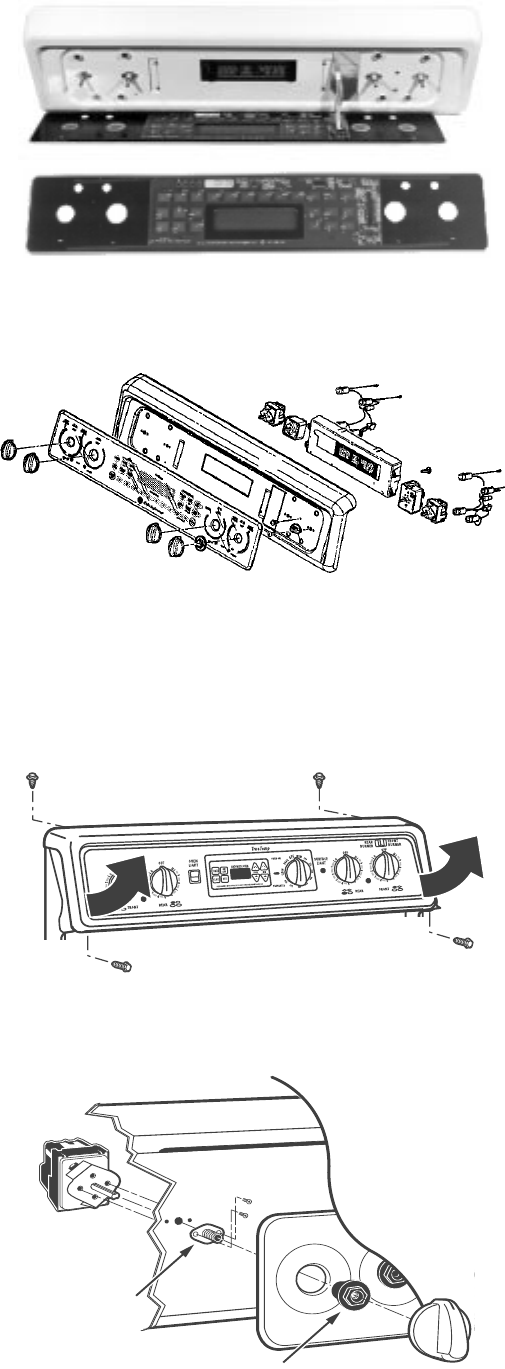
- CONTROL PANEL 22
- < 1 Ω 23
- ERC V SPECIAL FEATURES 24
- ERC FAULT CODE MEMORY TEST 26
- ERC FAULT CODE MEMORY DISPLAY 26
- ERC FAILURE CODES 27
- ERC ON BOARD DIAGNOSTIC TESTS 28
- NUMERIC KEY PADS TEST 29
- ENERGIZE OVEN LIGHT CIRCUIT 29
- LOCK MOTOR CYCLE TEST 30
- TrueTemp™ 31
- RR-BR & LR-O 32
- RF-BU•TR & LF-Y•TR 32
- LF (BRIDGE) & RF (OUTER) 32
- STRIP CIRCUITS 33
- VOLTAGE SENSITIVE 34
- Exploded Parts View 36
- JB960AB1AA 36
- EXPLODED PARTS BREAKDOWN 39
Philips SPD2519BM-00 manuály
Uživatelské manuály a uživatelské příručky pro Počítačový hardware Philips SPD2519BM-00.
Poskytujeme 1 manuály pdf Philips SPD2519BM-00 ke stažení zdarma podle typů dokumentů: Uživatelský manuál

Philips SPD2519BM-00 Uživatelský manuál (2 strany)
Značka: Philips | Kategorie: Computer hardware | Velikost: 0.40 MB |

Tabulka s obsahem
Další produkty a příručky pro Počítačový hardware Philips
| Modely | Typ Dokumentu |
|---|---|
| DR4I6B30F-17 |
Uživatelský manuál
Philips DR4I6B30F-17 User Manual,
2 stránky
|
| 221S3UCB-27 |
Uživatelský manuál
Philips 221S3UCB-27 User Manual,
2 stránky
|
| LFH0867-00 |
Uživatelský manuál
Philips LFH0867-00 User Manual,
3 stránky
|
| SGC2909-27 |
Uživatelský manuál
Philips SGC2909-27 User Manual,
2 stránky
|
| 19S1SS-00 |
Uživatelský manuál
Philips 19S1SS-00 User Manual,
3 stránky
|
| 19S1CB-00 |
Uživatelský manuál
Philips 19S1CB-00 User Manual,
3 stránky
|
| 109S4074 |
Uživatelský manuál
Philips 109S4074 User Manual,
108 stránky
|
| 190B7CS-27 |
Uživatelský manuál
Philips 190B7CS-27 User Manual,
98 stránky
|
| DVDRW620 |
Uživatelský manuál
Philips DVDRW620 User Manual,
2 stránky
|
| PPX2340-F7 |
Uživatelský manuál
Philips PPX2340-F7 User Manual,
2 stránky
|
| SHM7405-00 |
Uživatelský manuál
Philips SHM7405-00 User Manual,
1 stránky
|
| 237E3QPHSU-27 |
Uživatelský manuál
Philips 237E3QPHSU-27 User Manual,
42 stránky
|
| SE8881B-22 |
Uživatelský manuál
Philips SE8881B-22 User Manual,
12 stránky
|
| 201B45-74 |
Uživatelský manuál
Philips 201B45-74 User Manual,
130 stránky
|
| DN4S2J10C-17 |
Uživatelský manuál
Philips DN4S2J10C-17 User Manual,
2 stránky
|
| 190S5CS-27 |
Uživatelský manuál
Philips 190S5CS-27 User Manual,
89 stránky
|
| 107E51-99 |
Uživatelský manuál
Philips 107E51-99 User Manual,
128 stránky
|
| DECT2251G-17 |
Uživatelský manuál
Philips DECT2251G-17 User Manual,
2 stránky
|
| SHM6600-27 |
Uživatelský manuál
Philips SHM6600-27 User Manual,
2 stránky
|
| Brilliance LCD monitor with Ergo base USB Audio 24 |
Uživatelský manuál
Philips Brilliance LCD monitor with Ergo base USB Audio 240B1CS 24&quot;w B-line 1920x1200 - Format 1610 User Manual,
96 stránky
|
© 2020, manymanuals.pl. Wszelkie prawa zastrzeżone. | 0.026 s |
 Manymanuals.com
 Manymanuals.de
 Manymanuals.fr
 Manymanuals.it
 Manymanuals.pl
 Manymanuals.cz
 Manymanuals.es
 Manymanuals-pt.com
Komentarze do niniejszej Instrukcji