Sharp VL-E40S Informacje Techniczne Strona 58: Undeterminedproblems
 1
 2
 3
 4
 5
 6
 7
 8
 9
 10
 11
 12
 13
 14
 15
 16
 17
 18
 19
 20
 21
 22
 23
 24
 25
 26
 27
 28
 29
 30
 31
 32
 33
 34
 35
 36
 37
 38
 39
 40
 41
 42
 43
 44
 45
 46
 47
 48
 49
 50
 51
 52
 53
 54
 55
 56
 57
 58
 59
 60
 61
 62
 63
 64
 65
 66
 67
 68
 69
 70
 71
 72
 73
 74
 75
 76
 77
 78
 79
 80
 81
 82
 83
 84
 85
 86
 87
 88
 89
 90
 91
 92
 93
 94
 95
 96
 97
 98
 99
 100
 101
 102
 103
 104
 105
 106
 107
 108
 109
 110
 111
 112
 113
 114
 115
 116
 117
 118
 119
 120
 121
 122
 123
 124
 125
 126
 127
 128
 129
 130
 131
 132
 133
 134
 135
 136
 137
 138
 139
 140
 141
 142
 143
 144
 145
 146
 147
 148
 149
 150
 151
 152
 153
 154
 155
 156
 157
 158
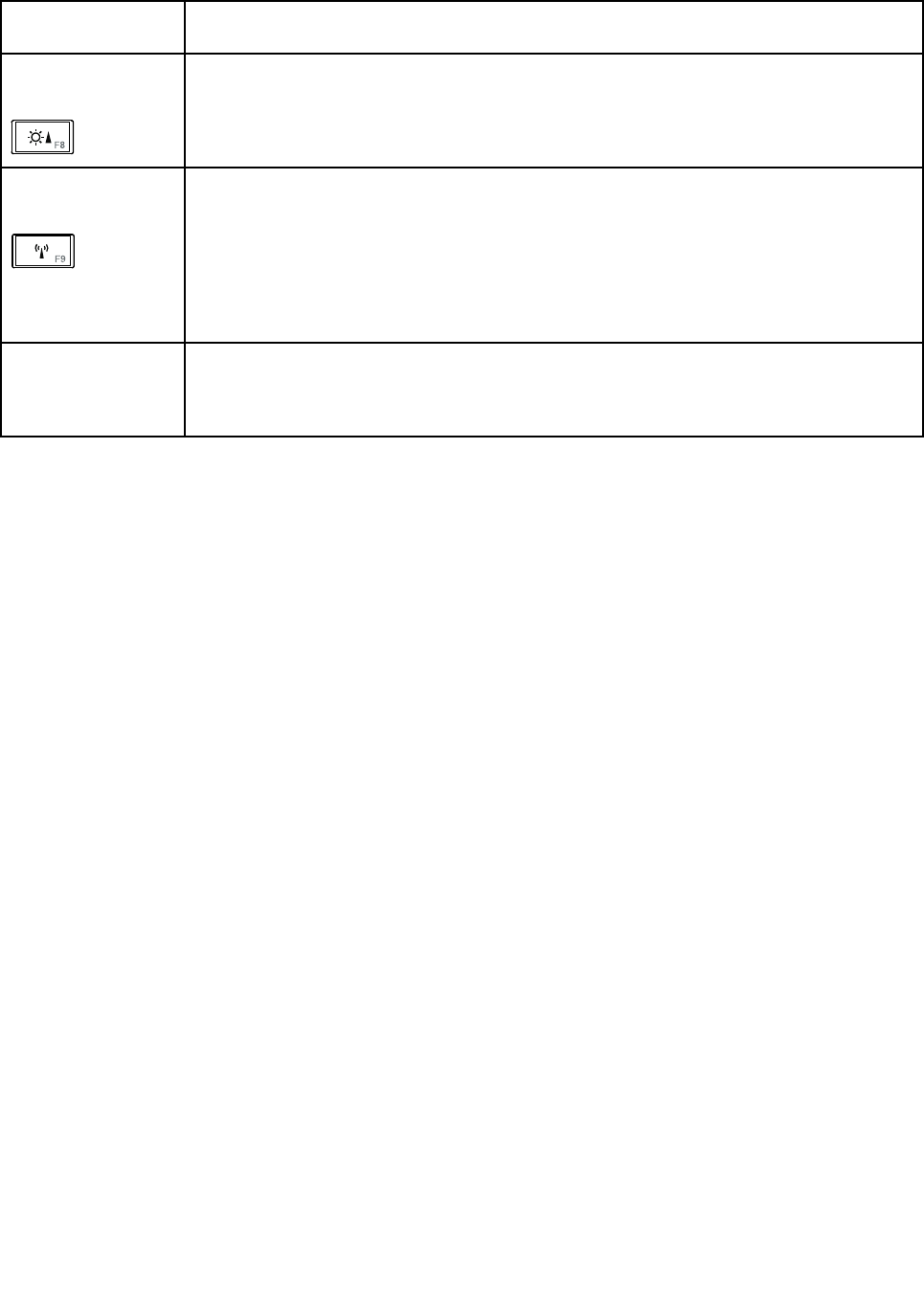
Table 7. Special keys and Fn key combination (continued)
Special key or Fn
key combination
Description
Display brightness up
(F8)
The computer display becomes brighter.
The purpose of this method is to change the brightness level temporarily. To change the
default brightness level, change the settings of the Power Option in the Control Panel or
use the Power Manager.
Wireless radio control
(F9)
Enable or disable the built-in wireless networking features. If you press this key, a list of
wireless features is displayed. You can quickly change the power state of each feature
in the list.
Notes:
To use this function, following device drivers must be installed on the computer
beforehand:
• Power Management driver
• OnScreen Display Utility
• Wireless device drivers
Fn + Spacebar (some
models)
Some models have a backlit keyboard. To illuminate the keyboard in less than perfect lighting,
press and hold the Fn key and press the Spacebar. If you turn on the keyboard illumination
and then turn the computer off, put it in sleep or hibernation mode, the keyboard illumination
setting is reset of “Off”.
52
Hardware Maintenance Manual
Plik PDF · ·
Pytania o Sharp VL-E40S
Nie ma jeszcze pytań o tę instrukcję. Zadaj pierwsze.
Powiązane produkty i podręczniki dla Kamery Sharp VL-E40S
- Kamery Sharp VL-Z1S Instrukcja Użytkownika
 (88 stron)
- Kamery Sharp VL-A10K Informacje Techniczne
 (71 stron)
- Kamery Sharp VL-NZ50S Instrukcja Użytkownika
 (60 stron)
- Kamery Sharp VL-Z3H Dokumentacja
(120 stron)
- Kamery Sharp VL-Z950S-E-T Instrukcja Użytkownika
 (133 strony)
- Kamery Sharp VL-Z500H Dokumentacja
(128 stron)
- Kamery Sharp VL-Z100S Instrukcja Użytkownika
(96 stron)
- Kamery Sharp VL-Z7S Instrukcja Użytkownika
 (80 stron)
- Kamery Sharp VL-Z8H Dokumentacja
(124 strony)
- Kamery Sharp VL-ME100S Instrukcja Użytkownika
 (132 strony)
- Kamery Sharp VL-Z100S Dokumentacja
(96 stron)
- Kamery Sharp VL-Z500S Dokumentacja
(128 stron)
- Kamery Sharp VL-A10K Informacje Techniczne
(52 strony)
- Kamery Sharp VL-NZ50E Dokumentacja
(73 strony)
- Kamery Sharp VL-Z3S Instrukcja Użytkownika
(118 stron)
- Kamery Sharp VL-Z1H Dokumentacja
(88 stron)
- Kamery Sharp VL-Z950S Instrukcja Użytkownika
 (77 stron)
- Kamery Sharp VL-Z900H-S Instrukcja Użytkownika
 (206 stron)
- Kamery Sharp VL-WD450S Dokumentacja
(112 stron)
- Kamery Sharp VL-Z800S-E-S Instrukcja Użytkownika
 (129 stron)