Sharp AL-2020 Dokumentacja Strona 46
- Strona / 90
- Spis treści
- ROZWIĄZYWANIE PROBLEMÓW
- BOOKMARKI

- CAUTIONS 3
- SOFTWARE LICENSE 4
- CONTENTS 5
- INTRODUCTION 6
- PART NAMES 7
- OPERATION PANEL 8
- SETTING UP THE UNIT 9
- ACCESSORIES 10
- Lock Unlock 11
- Grasp here and turn in 11
- INSTALLING THE TD CARTRIDGE 12
- CONNECTING THE POWER CORD 14
- Power off methods 15
- LOADING PAPER 16
- LOADING THE PAPER TRAY 17
- The multi-bypass tray 19
- Note for loading envelopes 20
- Note for loading thick paper 20
- INSTALLING THE SOFTWARE 21
- BEFORE INSTALLATION 22
- Connecting a USB cable 27
- Start indicator 35
- ONLINE indicator 35
- Power save indicator 35
- SCAN indicator 35
- USING THE PRINTER MODE 36
- How to print 37
- USING THE SCANNER MODE 38
- SHARP AR-xxxx 39
- SHARP AL-xxxx 41
- Press the start ( ) key 44
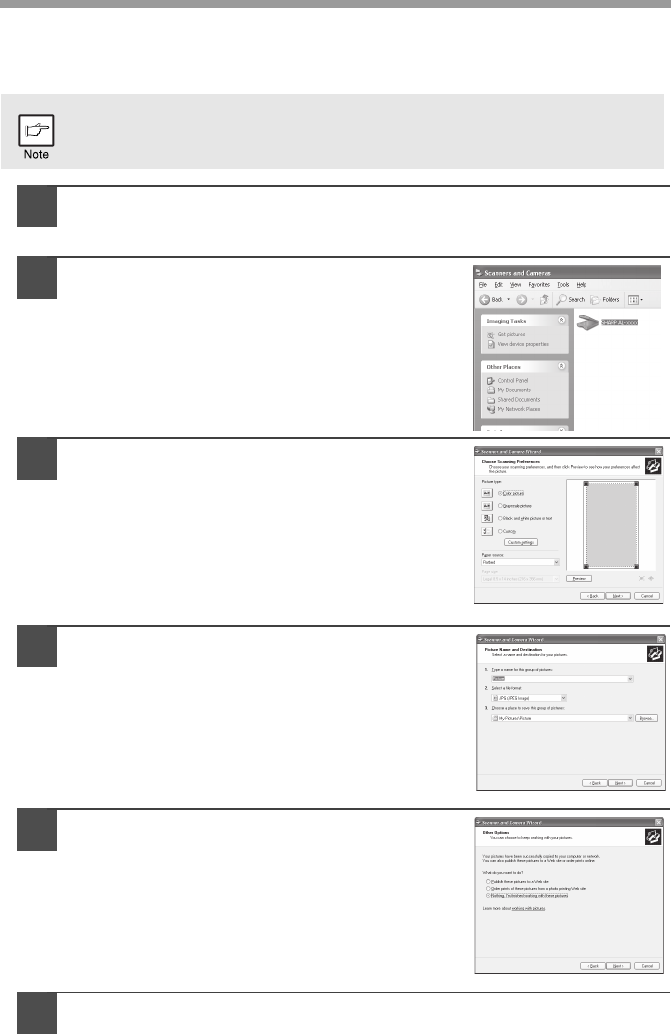
- WIA-SHARP AL-xxxx 45
- HOW TO USE THE ONLINE MANUAL 47
- MAKING COPIES 48
- ORIGINAL PLACEMENT 49
- Using the SPF (AL-2040) 50
- SET THE COPY QUANTITY 51
- Automatic exposure adjustment 52
- REDUCTION/ENLARGEMENT/ZOOM 53
- SELECTING THE PAPER TRAY 53
- SPECIAL FUNCTIONS 54
- TONER SAVE MODE 56
- USER PROGRAMS 57
- MAINTENANCE 59
- DRUM CARTRIDGE REPLACEMENT 60
- CLEANING THE UNIT 62
- Transfer charger 63
- TROUBLESHOOTING THE UNIT 64
- STATUS INDICATORS 65
- MISFEED REMOVAL 66
- B: Misfeed in the fusing area 68
- Roller rotating knob 69
- Document feeder cover 70
- SPF jam release leve 70
- WHEN USING THE SPF (AL-2040) 71
- APPENDIX 72
- ABOUT SUPPLIES AND OPTIONS 74
- MOVING AND STORING THE UNIT 75
- 3.HAZARDS IDENTIFICATION 77
- 4.FIRST-AID MEASURES 77
- 5.FIRE-FIGHTING MEASURES 77
- 7.HANDLING AND STORAGE 77
- 10.STABILITY AND REACTIVITY 78
- 11.TOXICOLOGICAL INFORMATION 78
- 12.ECOLOGICAL INFORMATION 79
- 13.DISPOSAL CONSIDERATIONS 79
- 14.TRANSPORT INFORMATION 79
- 15.REGULATORY INFORMATION 79
- 16.OTHER INFORMATION 79
- INDEX BY PURPOSE 86
- LASER PRODUCT 88
- LASER KLASSE 1 88
- AL-2020/AL-2040_v1 90
Powiązane produkty i podręczniki dla Kopiarki Sharp AL-2020
 (140 strony)
(100 strony)
(14 strony)
(92 strony)
(104 strony)
(12 strony)
(4 strony)
(40 strony)
(12 strony)
(12 strony)
(88 strony)
(117 strony)
(12 strony)
(56 strony)
(44 strony)

 (47 strony)
(160 strony)
(79 strony)
(36 strony)
Philips SPD2519BM-00 manuály
Uživatelské manuály a uživatelské příručky pro Počítačový hardware Philips SPD2519BM-00.
Poskytujeme 1 manuály pdf Philips SPD2519BM-00 ke stažení zdarma podle typů dokumentů: Uživatelský manuál

Philips SPD2519BM-00 Uživatelský manuál (2 strany)
Značka: Philips | Kategorie: Computer hardware | Velikost: 0.40 MB |
Tabulka s obsahem
Další produkty a příručky pro Počítačový hardware Philips
| Modely | Typ Dokumentu |
|---|---|
| DR4I6B30F-17 |
Uživatelský manuál
Philips DR4I6B30F-17 User Manual,
2 stránky
|
| 221S3UCB-27 |
Uživatelský manuál
Philips 221S3UCB-27 User Manual,
2 stránky
|
| LFH0867-00 |
Uživatelský manuál
Philips LFH0867-00 User Manual,
3 stránky
|
| SGC2909-27 |
Uživatelský manuál
Philips SGC2909-27 User Manual,
2 stránky
|
| 19S1SS-00 |
Uživatelský manuál
Philips 19S1SS-00 User Manual,
3 stránky
|
| 19S1CB-00 |
Uživatelský manuál
Philips 19S1CB-00 User Manual,
3 stránky
|
| 109S4074 |
Uživatelský manuál
Philips 109S4074 User Manual,
108 stránky
|
| 190B7CS-27 |
Uživatelský manuál
Philips 190B7CS-27 User Manual,
98 stránky
|
| DVDRW620 |
Uživatelský manuál
Philips DVDRW620 User Manual,
2 stránky
|
| PPX2340-F7 |
Uživatelský manuál
Philips PPX2340-F7 User Manual,
2 stránky
|
| SHM7405-00 |
Uživatelský manuál
Philips SHM7405-00 User Manual,
1 stránky
|
| 237E3QPHSU-27 |
Uživatelský manuál
Philips 237E3QPHSU-27 User Manual,
42 stránky
|
| SE8881B-22 |
Uživatelský manuál
Philips SE8881B-22 User Manual,
12 stránky
|
| 201B45-74 |
Uživatelský manuál
Philips 201B45-74 User Manual,
130 stránky
|
| DN4S2J10C-17 |
Uživatelský manuál
Philips DN4S2J10C-17 User Manual,
2 stránky
|
| 190S5CS-27 |
Uživatelský manuál
Philips 190S5CS-27 User Manual,
89 stránky
|
| 107E51-99 |
Uživatelský manuál
Philips 107E51-99 User Manual,
128 stránky
|
| DECT2251G-17 |
Uživatelský manuál
Philips DECT2251G-17 User Manual,
2 stránky
|
| SHM6600-27 |
Uživatelský manuál
Philips SHM6600-27 User Manual,
2 stránky
|
| Brilliance LCD monitor with Ergo base USB Audio 24 |
Uživatelský manuál
Philips Brilliance LCD monitor with Ergo base USB Audio 240B1CS 24"w B-line 1920x1200 - Format 1610 User Manual,
96 stránky
|
© 2020, manymanuals.pl. Wszelkie prawa zastrzeżone. | 0.023 s |
 Manymanuals.com
 Manymanuals.de
 Manymanuals.fr
 Manymanuals.it
 Manymanuals.pl
 Manymanuals.cz
 Manymanuals.es
 Manymanuals-pt.com
Komentarze do niniejszej Instrukcji