Sharp MX-M363N Dokumentacja Strona 24

  • Pobierz
  • Dodaj do moich podręczników
  • Drukuj
  • Strona
    / 113
  • Spis treści
  • BOOKMARKI
  • Oceniono. / 5. Na podstawie oceny klientów
Przeglądanie stron 23
24
M
M
X
X
-
-
M
M
5
5
0
0
3
3
N
N
/
/
U
U
4
4
5
5
3
3
N
N
/
/
U
U
M
M
X
X
-
-
M
M
3
3
6
6
3
3
N
N
/
/
U
U
2
2
8
8
3
3
N
N
S
S
a
a
l
l
e
e
s
s
G
G
u
u
i
i
d
d
e
e
Productivity
Not only are the MX-M503N/U, MX-M453N/U, MX-M363N/U, and MX-M283N incredibly easy
to use, they are also very efficient – helping you to achieve the best productivity possible from
your MFP.
Fast scanning speed and colour scanning supported
The MX-M503N, MX-M453N, and MX-M363N can scan at speeds of up to 70opm
(with DSPF: 200dpi) in both colour and mono. The MX-M503U, MX-M453U,
MX-M363U, and MX-M283N can scan at speeds of up to 50opm (with RSPF: 200dpi) in both colour
(MX-M283N only) and mono. No waiting next to the machine for your originals to complete scanning!
Note: Although N models support colour scanning, they don’t support the Auto Colour Selection and the
Auto Colour mode that clearly reproduces each component such as texts or photos clearly and that
suppresses background automatically.
Combine this with the fast warm-up time of up to 20 seconds*
1
, and fast first copy out times (4.6s:
MX-M363N/U and MX-M283N, 3.9s: MX-M503N/U and MX-M453N/U)*
2
and you can see that everything
has been designed with efficiency in mind.
*
1
At rated voltage. May vary depending on machine conditions and operating environment.
*
2
Best achieved time based on A4 copy, long-edge feeding from 1
st
paper drawer, using document glass, when machine is ready.
May vary depending on machine conditions and operating environment.
Gigabit Ethernet (1000Base-T)
As well as scanning and output speed, the speed of the network connection has also been improved with
the addition of Gigabit Ethernet – so your print jobs will reach the MFP faster, and your scan jobs will be sent
much more quickly as well.
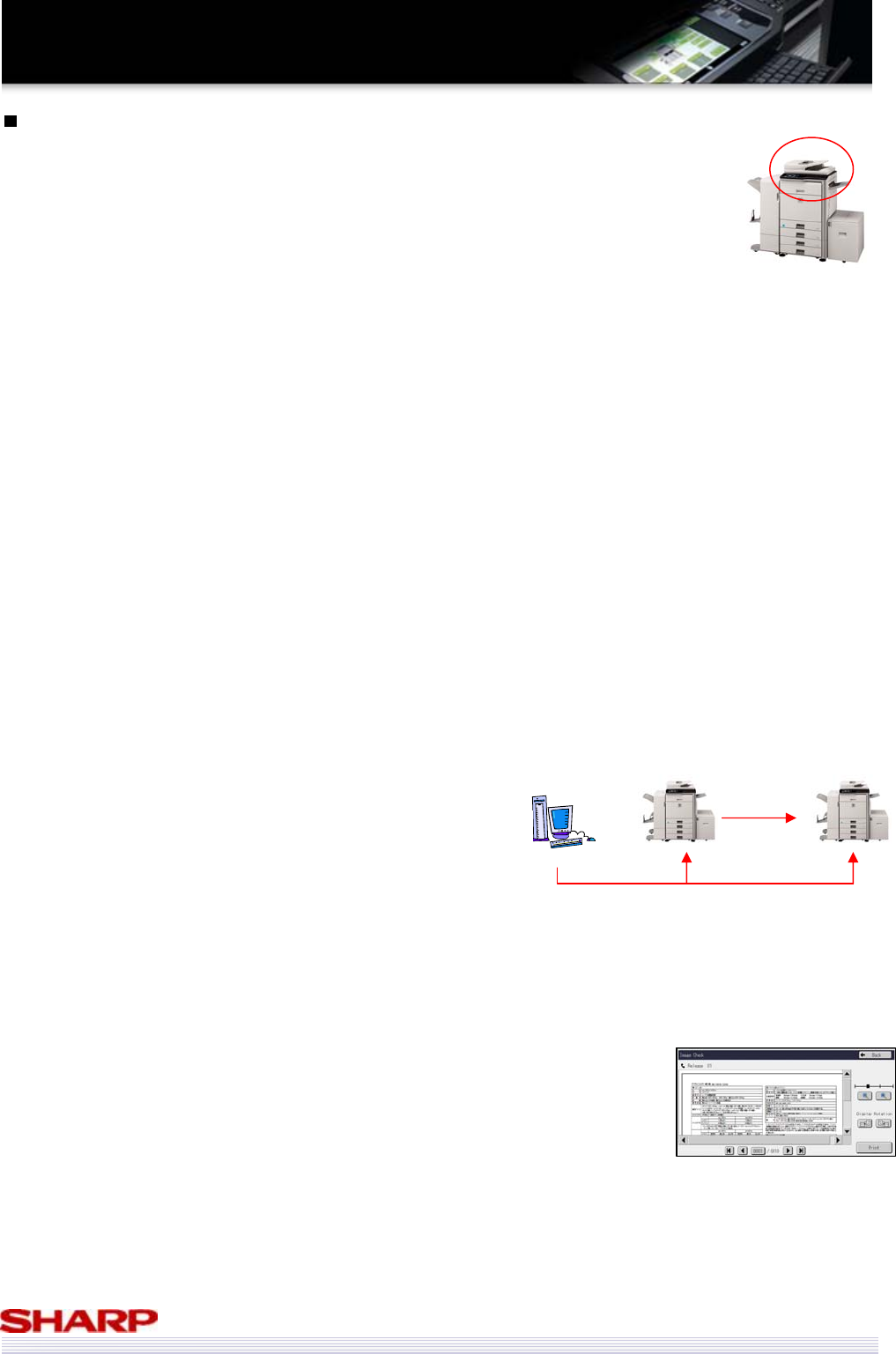
Tandem Print & Copy
If you have a particularly urgent job, and 50ppm isn’t fast enough, you can combine the output speed of 2
MFPs to output a single job, doubling your output speed of up to 100ppm. To execute tandem print & copy,
users have to use same configuration machines. (U model has to be equipped HDD.)
Direct SMTP
When using Internet Fax, if both the sending and receiving machine are capable of operating by Direct SMTP,
the Fax can be transmitted without going through the mail server. This eliminates a potential bottle neck,
and since the Fax is transmitted directly, it takes less time to arrive.
Fax Inbound routing (N model and U model with HDD) & preview (N model only)
When you receive a fax, it can either be printed out immediately, forwarded on
to a user, who can decide whether it should be printed at their own PC, or it
can be stored on your MFP and previewed on the LCD panel, ensuring that junk
faxes are not printed, saving your time and money.
Stamp Unit
Users may wish to have evidence that all of their documents have been scanned without any problems.
(e.g in case of important fax sending, or paper document digitalisation) The stamp unit allows users to
check which documents have already been scanned, and in case of a duplex original, the marks are stamped
twice on the front side of the document.
Jobs sent to one MFP can be
set to also output on another,
doubling overall output speed
Copy
Print out
Przeglądanie stron 23
1 2 ... 19 20 21 22 23 24 25 26 27 28 29 ... 112 113

Komentarze do niniejszej Instrukcji

Brak uwag

Vigo VG09035K manuály

Uživatelské manuály a uživatelské příručky pro Pro domov Vigo VG09035K.
Poskytujeme 1 manuály pdf Vigo VG09035K ke stažení zdarma podle typů dokumentů: Uživatelský manuál


Další produkty a příručky pro Pro domov Vigo

Modely Typ Dokumentu
VG09035K1 Uživatelský manuál   Vigo VG09035K1 User Manual, 7 stránky
VG09036K1 Uživatelský manuál   Vigo VG09036K1 User Manual, 7 stránky
VG09036K Uživatelský manuál   Vigo VG09036K User Manual, 7 stránky
VG09037K1 Uživatelský manuál   Vigo VG09037K1 User Manual, 7 stránky
VG09037K Uživatelský manuál   Vigo VG09037K User Manual, 7 stránky
VG09038K1 Uživatelský manuál   Vigo VG09038K1 User Manual, 7 stránky
VG09038K Uživatelský manuál   Vigo VG09038K User Manual, 7 stránky
VG09039K1 Uživatelský manuál   Vigo VG09039K1 User Manual, 7 stránky
VG09039K Uživatelský manuál   Vigo VG09039K User Manual, 7 stránky
VG09010K1 Uživatelský manuál   Vigo VG09010K1 User Manual, 7 stránky
VG09010K Uživatelský manuál   Vigo VG09010K User Manual, 7 stránky
VG09017K1 Uživatelský manuál   Vigo VG09017K1 User Manual, 7 stránky
VG09017K Uživatelský manuál   Vigo VG09017K User Manual, 7 stránky
VG09018K Uživatelský manuál   Vigo VG09018K User Manual, 7 stránky
VG09018K1 Uživatelský manuál   Vigo VG09018K1 User Manual, 7 stránky
VG09019K1 Uživatelský manuál   Vigo VG09019K1 User Manual, 7 stránky
VG09019K Uživatelský manuál   Vigo VG09019K User Manual, 7 stránky
VG09020K1 Uživatelský manuál   Vigo VG09020K1 User Manual, 7 stránky
VG09020K Uživatelský manuál   Vigo VG09020K User Manual, 7 stránky
VG09027K Uživatelský manuál   Vigo VG09027K User Manual, 7 stránky