Sharp 27SC260 Instrukcja Użytkownika Strona 5

  • Pobierz
  • Dodaj do moich podręczników
  • Drukuj
  • Strona
    / 54
  • Spis treści
  • BOOKMARKI
  • Oceniono. / 5. Na podstawie oceny klientów
Przeglądanie stron 4
5
Dimension: 140mm x 215mm
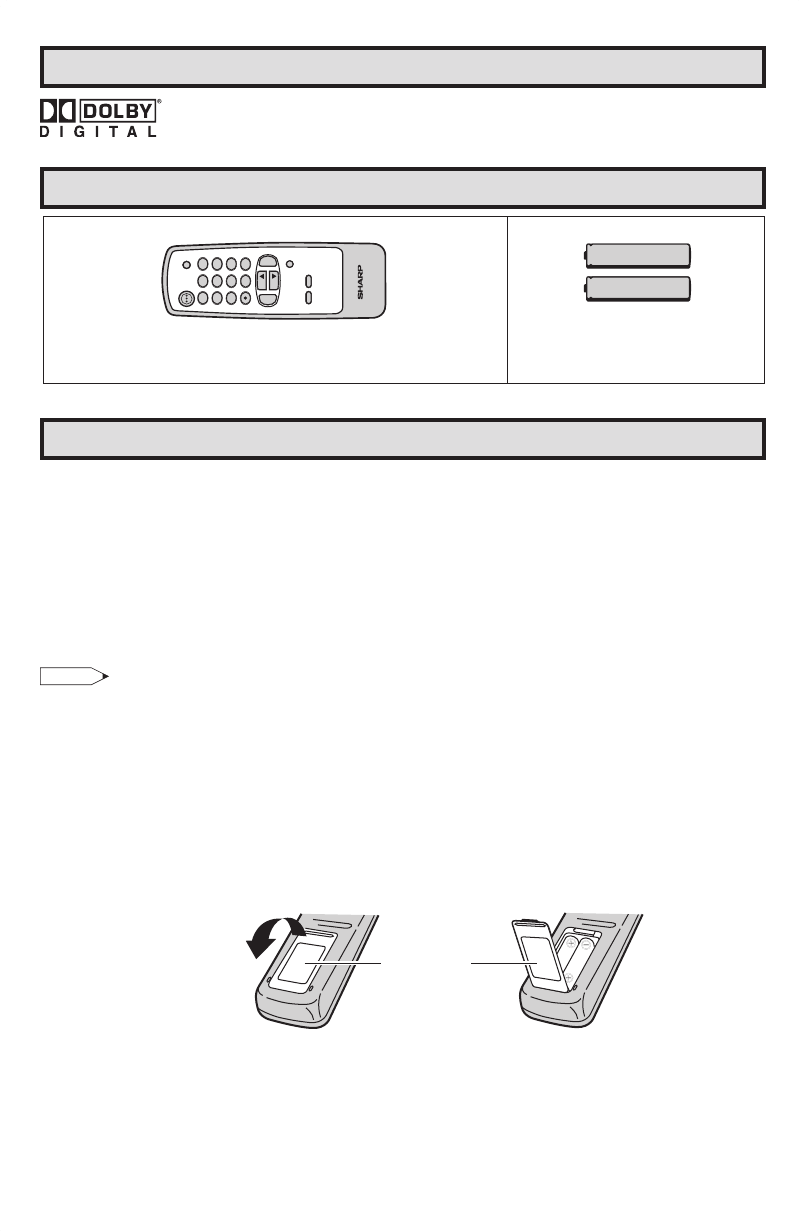
Supplied Accessories
Size AA
Dry Batteries
Infrared Remote Control
Location
• For normal operation, your TV should be located in an area of the room where cool adequate
ventilation is provided. Do not place the back of the television set in a place where free airflow will
be restricted.
Any magnetic force may disturb the color picture. Make sure that magnets, electric clocks, toys using
magnets or any other magnetic substance, such as iron are kept well away from the TV set.
Power
Your TV operates on 120 Volts, 60 Hz (normal household current) and has a polarized plug. If you
are unable to insert the plug fully into the outlet, try reversing the plug. Should it fail to fit, contact an
electrician. Do not defeat the safety feature of the polarized plug.
Note:
• If the set is not going to be used for a long period, such as during a vacation, unplug the set from the
wall outlet to economize power. (If the TV set is plugged in, a slight current still flows, even with the
POWER BUTTON in the OFF position.)
• Lines and other noise may appear in TV broadcast images when an FM tuner or radio is located
near the TV and both radio and TV broadcasts are being received. Should such noise appear, turn
off the radio.
• If you are listening to an AM broadcast, turn the TV off. AM broadcast signals may not be received
due to interference from the TV.
Before using the television, prepare the Remote Control
To use the remote control, insert batteries first.
Inserting the batteries
• With your thumbnail, pull up the slit as indicated by the arrow to remove the battery cover. Insert two
batteries (size “AA”). Be sure to match the battery
m/, terminals with the m/, marks inside the
compartment.
Before Operating Your Television
Battery
Cover
Pull up
Trademarks
Dolby and the double-D symbol are registered trademarks of Dolby Laboratories.


 







5-7.indd 5 11/22/05 4:33:50 PM
Przeglądanie stron 4
1 2 3 4 5 6 7 8 9 10 ... 53 54

Komentarze do niniejszej Instrukcji

Brak uwag

Vigo VG09035K manuály

Uživatelské manuály a uživatelské příručky pro Pro domov Vigo VG09035K.
Poskytujeme 1 manuály pdf Vigo VG09035K ke stažení zdarma podle typů dokumentů: Uživatelský manuál


Další produkty a příručky pro Pro domov Vigo

Modely Typ Dokumentu
VG09035K1 Uživatelský manuál   Vigo VG09035K1 User Manual, 7 stránky
VG09036K1 Uživatelský manuál   Vigo VG09036K1 User Manual, 7 stránky
VG09036K Uživatelský manuál   Vigo VG09036K User Manual, 7 stránky
VG09037K1 Uživatelský manuál   Vigo VG09037K1 User Manual, 7 stránky
VG09037K Uživatelský manuál   Vigo VG09037K User Manual, 7 stránky
VG09038K1 Uživatelský manuál   Vigo VG09038K1 User Manual, 7 stránky
VG09038K Uživatelský manuál   Vigo VG09038K User Manual, 7 stránky
VG09039K1 Uživatelský manuál   Vigo VG09039K1 User Manual, 7 stránky
VG09039K Uživatelský manuál   Vigo VG09039K User Manual, 7 stránky
VG09010K1 Uživatelský manuál   Vigo VG09010K1 User Manual, 7 stránky
VG09010K Uživatelský manuál   Vigo VG09010K User Manual, 7 stránky
VG09017K1 Uživatelský manuál   Vigo VG09017K1 User Manual, 7 stránky
VG09017K Uživatelský manuál   Vigo VG09017K User Manual, 7 stránky
VG09018K Uživatelský manuál   Vigo VG09018K User Manual, 7 stránky
VG09018K1 Uživatelský manuál   Vigo VG09018K1 User Manual, 7 stránky
VG09019K1 Uživatelský manuál   Vigo VG09019K1 User Manual, 7 stránky
VG09019K Uživatelský manuál   Vigo VG09019K User Manual, 7 stránky
VG09020K1 Uživatelský manuál   Vigo VG09020K1 User Manual, 7 stránky
VG09020K Uživatelský manuál   Vigo VG09020K User Manual, 7 stránky
VG09027K Uživatelský manuál   Vigo VG09027K User Manual, 7 stránky