Sharp 27F641 Instrukcja Użytkownika Strona 42

  • Pobierz
  • Dodaj do moich podręczników
  • Drukuj
  • Strona
    / 60
  • Spis treści
  • BOOKMARKI
  • Oceniono. / 5. Na podstawie oceny klientów
Przeglądanie stron 41
42
Dimension: 140 X 215 mm
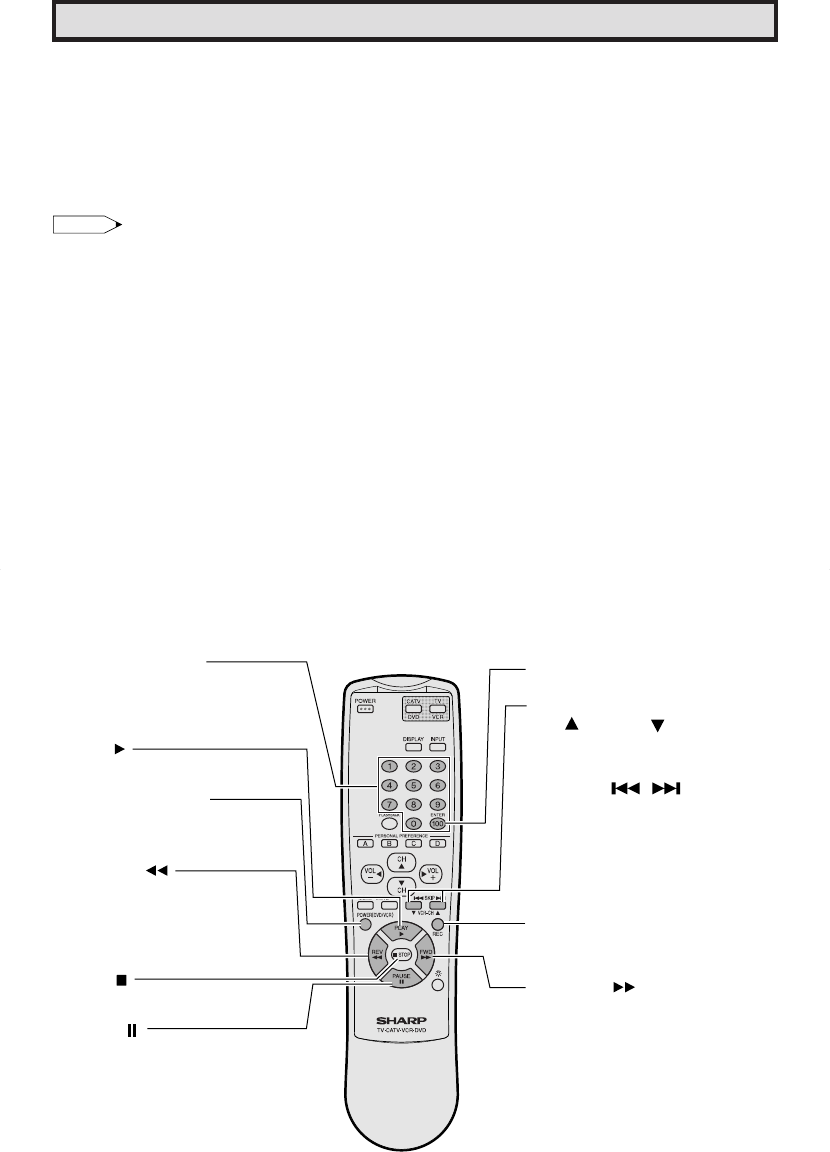
POWER (DVD/VCR)
Press to turn the VCR or DVD
on and off.
STOP
Press to stop the tape or disc.
PAUSE
Press to temporarily stop the
tape or disc during playback
or recording (VCR only).
Press again to release PAUSE.
REVERSE
Press to rewind a tape or
reverse a disc. For some VCRs
or DVDs you may need to
press STOP first, then REVERSE.
FORWARD
Press to rapidly advance the
tape or disc. For some VCRs or
DVDs, you may need to press
STOP first, then FWD.
REC
Press to begin recording.
(VCR only)
DVD SKIP
Press to jump forward to the
beginning of the next chapter/track,
or backward to the beginning of the
current chapter/track, and
automatically start to play that
chapter/track.
VCR CHANNEL
UP ( )/ DOWN ( )
Press to scan up or down through
channels on the VCR.
REMOTE KEYPAD
Use to enter two-digit code
numbers when identifying your
VCR, DVD and CATV converter.
ENTER
PLAY
Press to playback a tape or disc.
Operation of Universal Remote Control
Universal Remote Control
With the purchase of your television set you
also have received the latest innovation in
remote control technology. With its easy-to-use
push button keyboard, your Remote can
control your television set and most infrared
remote controlled VCRs, cable TV converters
and DVDs as well.
Note:
Depending on the model, year produced,
brand and type of VCR, cable TV converter
and DVD, some models may not be compatible
with the remote control.
Some brands may not enable channel
selection until the ENTER button is pressed.
In such case, try the following.
Example:
When you select channel 24,
(1) Press REMOTE KEYPAD “2”.
(2) Press REMOTE KEYPAD “4”.
(3) Press ENTER.
For detailed information on the use of the
Cable TV converter Box refer to their operating
manuals.
Using your Remote with your TV
After installing the batteries, press the TV/VCR
on the Remote to select the TV mode. (If you
can change the channel of the TV by pressing
CH a/s on the Remote Control, it is in the
TV mode.)
Identifying VCRs, cable TV converters
and DVDs
Your Remote Control has been set at the
factory to operate your TV and many remote
controlled VCRs, cable TV converters and
DVDs. However, in some cases an easy one-
time set-up step may be necessary before the
Remote will operate accessory VCRs, cable
TV converters and DVDs.
In this set-up step, the Remote locates and
memorizes the remote control transmitter code
for the VCR, cable TV converters and DVDs.
Once “identified”, the Remote sends proper
signals to operate your accessory.
• This identifying step will not have to be
repeated until power to the Remote is
interrupted due to a battery failure.
Using your remote control with a VCR
Once you make certain the Remote Control
has “identified” your remote controlled VCR or
DVD, the Remote is ready to operate your unit.
The various VCR or DVD function buttons on
the Remote will not operate your VCR or DVD
if those features are not already found on your
unit.
All VCR buttons will operate whether the
Remote is in TV or VCR modes.
For detailed information on the use of the VCR
or DVD, refer to the operation manual of the
VCR or DVD.
27F541 42
Przeglądanie stron 41
1 2 ... 37 38 39 40 41 42 43 44 45 46 47 ... 59 60

Komentarze do niniejszej Instrukcji

Brak uwag

Audiovox CDC-FDW manuals

Owner’s manuals and user’s guides for CD players Audiovox CDC-FDW.
We providing pdf manuals Audiovox CDC-FDW for download free by document types:


More products and manuals for CD players Audiovox

Models Document Type
ACC-52 User Manual   Audiovox ACC-52 User's Manual, 20 pages
CE148 User Manual     Audiovox CE148 User's Manual, 6 pages
XCH10RF User Manual     Audiovox XCH10RF User's Manual, 23 pages
P-99A User Manual     Audiovox P-99A User's Manual, 48 pages
CE151MP User Manual   Audiovox CE151MP User's Manual, 8 pages
MP3 User Manual   Audiovox MP3 User's Manual, 2 pages
811-870091-170 User Manual   Audiovox 811-870091-170 User's Manual, 2 pages
CD Alarm Clock User Manual     Audiovox CD Alarm Clock User's Manual [en] , 6 pages
Portable CD System User Manual     Audiovox Portable CD System User's Manual [en] , 6 pages
Prestige P953ESP User Manual   Audiovox Prestige P953ESP User's Manual, 20 pages
CE1000X User Manual   Audiovox CE1000X User's Manual, 7 pages
CE147 User Manual   Audiovox CE147 User's Manual, 2 pages
VM9026 Owner's Manual   Audiovox VM9026 Owner's Manual, 48 pages
Dvd3100 User Manual   Audiovox Dvd3100 User's Manual, 22 pages
DM8710-8JAS User Manual   Audiovox DM8710-8JAS User's Manual, 2 pages
DVD4000 Owner's Manual   Audiovox DVD4000 Owner`s manual, 14 pages
GC-600 Owner's Manual   Audiovox GC-600 Owner`s manual, 13 pages
D1909 - DVD Player - 9 Owner's Manual   Audiovox D1909 - DVD Player - 9 Owner`s manual, 20 pages
VE706 Operations Instructions   Audiovox VE706 Operating instructions, 21 pages
P48 User Manual   Audiovox P48 User`s manual, 42 pages