Sharp FO-K01 Dokumentacja Strona 12

  • Pobierz
  • Dodaj do moich podręczników
  • Drukuj
  • Strona
    / 15
  • Spis treści
  • BOOKMARKI
  • Oceniono. / 5. Na podstawie oceny klientów
Przeglądanie stron 11
10
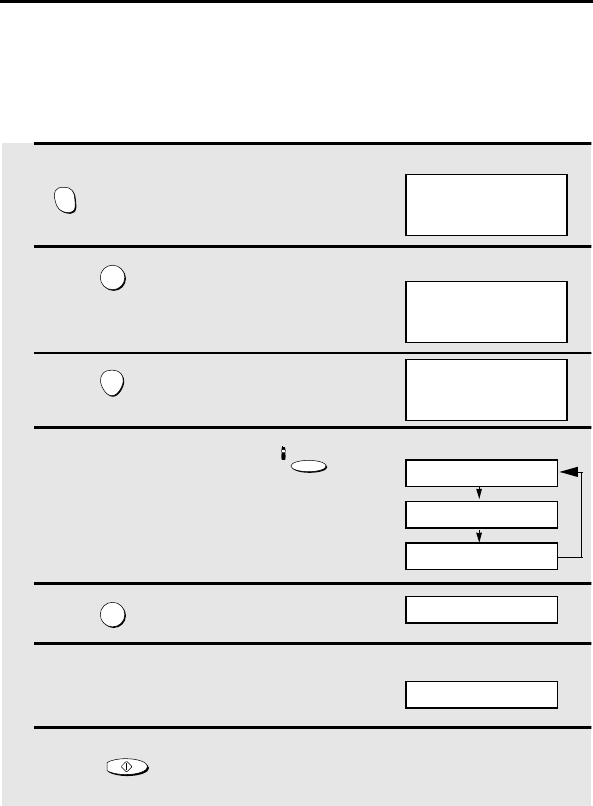
Deleting a cordless handset
If you wish to stop using a cordless handset, follow these steps to delete it
(cancel the registration in the fax machine).
1 On the cordless handset, hold down
until the display at right appears.
2 Press on the cordless handset.
3 Press on the cordless handset.
4 On the fax machine, hold down
until the display at right appears.
5 Press on the fax machine.
6
On the fax machine, enter the number
of the cordless handset that you wish
to delete.
7 Press on the fax machine.
INTER
COM
2
START
INTERCOM
2
START/MEMORY
MODE SELECT
1: HS ENTRY
2: HS DELETE
Cordless handset display:
HS2 DELETE: OK?
PRESS START KEY
Fax machine display:
MODE SELECT
1: HS ENTRY
2: HS DELETE
PRESS HS NUMBER
Note: To ensure correct operation, be sure to perform the deletion procedure
both on the cordless handset and on the fax machine, as explained above.
PLEASE REGISTER
Example: Cordless handset 2
DELETE HS2?
Example: Cordless handset 2
all.bookPage10Tuesday,January28,20039:38AM
Przeglądanie stron 11
1 2 ... 7 8 9 10 11 12 13 14 15

Komentarze do niniejszej Instrukcji

Brak uwag