Sharp MX-2700N Instrukcja Użytkownika Strona 44
- Strona / 67
- Spis treści
- BOOKMARKI

- User's Guide 1
- TABLE OF CONTENTS 2
- ABOUT THIS MANUAL 3
- Icons used in the manuals 4
- BEFORE USING THE MACHINE 5
- (9) (11)(10) (14)(12) (13) 6
- INTERIOR 7
- Automatic document feeder 8
- Document cover 8
- CONNECTORS 9
- OPERATION PANEL 10
- ☞ [POWER SAVE] KEY (page 14) 11
- TOUCH PANEL 12
- (5)(4) (6) (9)(7) (8) 13
- TURNING THE POWER ON AND OFF 14
- ENERGY SAVE FUNCTIONS 15
- [POWER SAVE] KEY 15
- USER AUTHENTICATION 16
- Select your user name 18
- Touch the [Password] key 19
- Touch the [OK] key 19
- LOADING PAPER 21
- USEABLE PAPER 22
- Paper that cannot be used 23
- Paper that is not recommended 23
- CHANGING THE PAPER SIZE 25
- SETTINGS 26
- (20 lbs.)) 27
- ((148 432) 30
- (100 297) 30
- Inserting paper 31
- Inserting tab paper 31
- Inserting transparency film 32
- Close the right side cover 33
- ORIGINALS 34
- (8-1/2" x 14") 35
- Place the original 37
- Placing a thick book 38
- PERIPHERAL DEVICES 39
- Punch module 39
- FINISHER 41
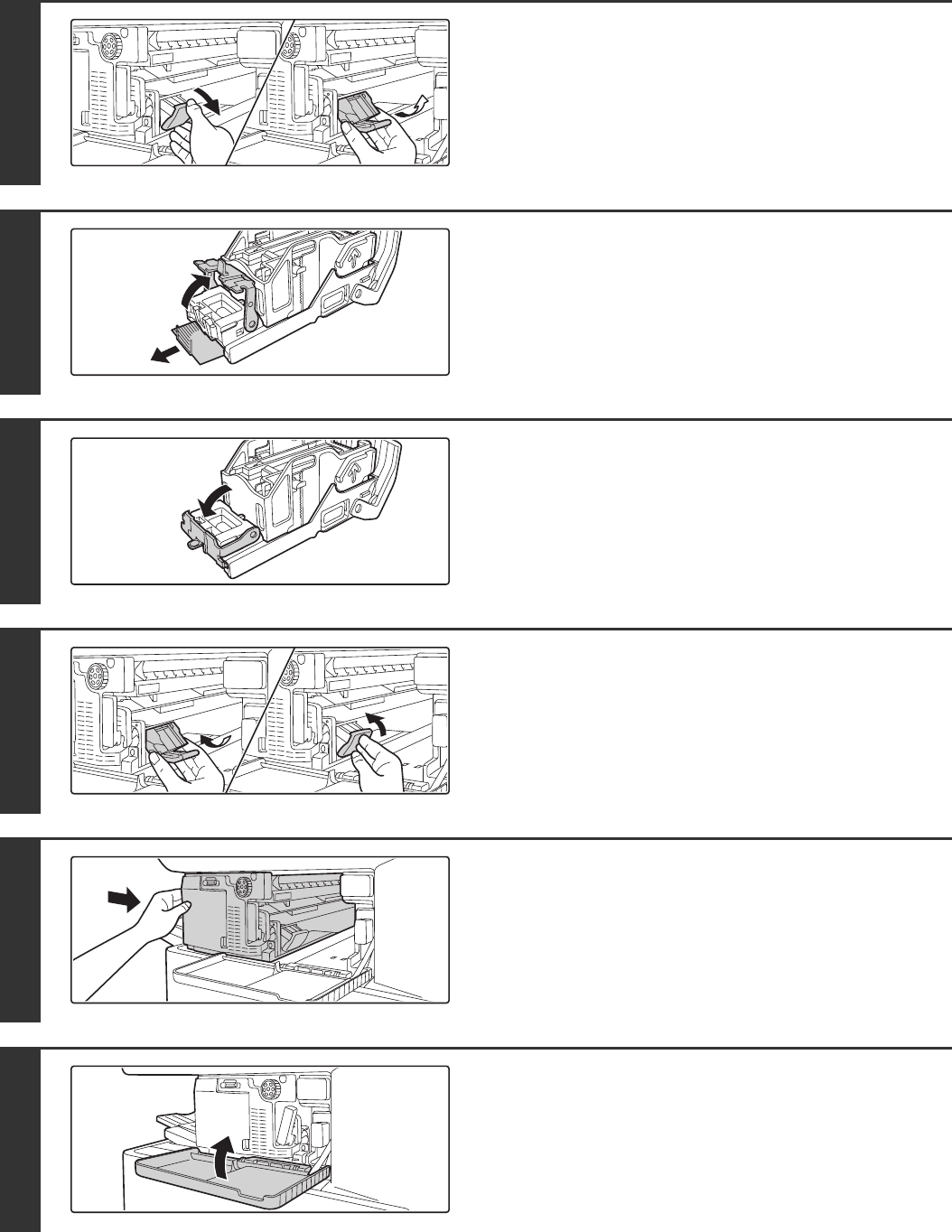
- FINISHER MAINTENANCE 42
- Removing staple jams 43
- SADDLE STITCH FINISHER 46
- MAINTENANCE 53
- CLEANING THE LASER UNIT 55
- Clean the laser unit 57
- Replace the cleaning tool 58
- Close the front cover 58
- Open the front cover 59
- REPLACING THE WASTE TONER BOX 62
- Plug the holes 63
- ENTERING TEXT 65
- CHANGING THE ENTRY MODE 66
- MX2700-EX-USR-Z1 67
Powiązane produkty i podręczniki dla Drukarki Sharp MX-2700N
 (76 strony)
(220 strony)
(248 strony)
(152 strony)
(36 strony)
(54 strony)
(130 strony)
(183 strony)
(172 strony)
(76 strony)
(220 strony)
(248 strony)
(152 strony)
(36 strony)
(54 strony)
(130 strony)
(183 strony)
(172 strony)
 (12 strony)
(12 strony)
(12 strony)
© 2020, manymanuals.pl. Wszelkie prawa zastrzeżone. | 0.049 s |
 Manymanuals.com
 Manymanuals.de
 Manymanuals.fr
 Manymanuals.it
 Manymanuals.pl
 Manymanuals.cz
 Manymanuals.es
 Manymanuals-pt.com
Komentarze do niniejszej Instrukcji