Sharp SL-6000N Dokumentacja Strona 31
- Strona / 107
- Spis treści
- ROZWIĄZYWANIE PROBLEMÓW
- BOOKMARKI

- SL-6000L/SL-6000N 1
- FOR YOUR RECORDS 2
- Introduction 4
- Introduction 3 5
- Contents 6
- How to View Online Manuals 7
- Cheking the contents 8
- Start-up Guide (this book) 9
- (Software and Online 9
- Manuals, etc.) 9
- Getting Started 10
- 1. Connect the AC power 11
- 2. Plug the AC adapter 11
- 4. Make sure the Zaurus 11
- Step 2: 12
- Step 3: 13
- Setting the date and time 14
- Getting Started 13 15
- Setting your passcode 16
- Step 4: 17
- About USB Ports 18
- Windows XP 18
- Windows 2000 18
- Getting Started 17 19
- 18 Getting Started 20
- USB connector 20
- USB port 20
- Getting Started 19 21
- Adding the software 22
- Removing the software 22
- Removing all software 22
- About Your Zaurus 23
- Applications 24
- Settings 25
- 24 About Your Zaurus 26
- Part names and functions 27
- About Your Zaurus 27 29
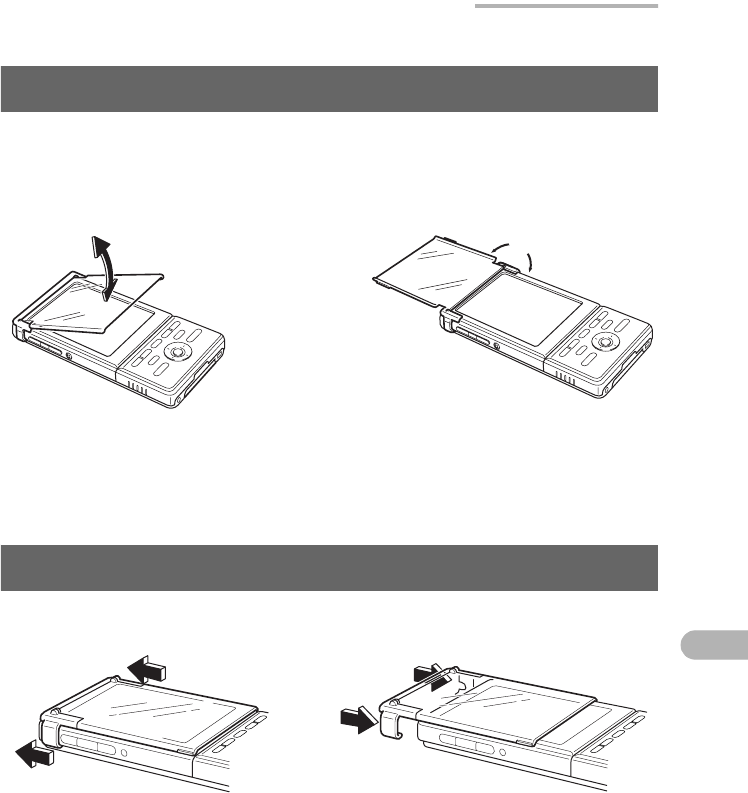
- Display protection cover 31
- 32 About Your Zaurus 34
- Docking Station 34
- Basic Operations 35
- Operating methods 36
- Home Screen 37
- Using the taskbar 38
- Files Home Screen 39
- Reorganizing Your Files 41
- Creating a new folder 42
- Basic Operations 41 43
- 42 Basic Operations 44
- Naming folders and files 45
- Menu list 46
- Basics of Using Applications 47
- Application Fast Load 48
- 3. Press the OK key 48
- Using the Menu bar 49
- Menu operations 50
- Moving the focus 51
- Menu and shortcut icons 51
- Creating a new entry 52
- Modifying an entry 53
- Selecting from a list 53
- Drop-down list 54
- Combobox 54
- Basic Operations 53 55
- Tap here and enter 55
- Tap here 55
- Using checkboxes 56
- Using the radio buttons 56
- Categorizing entries 57
- 3. Tap the “Add” button 58
- Basic Operations 57 59
- Category checkbox 59
- 58 Basic Operations 60
- Drop-down list button 60
- Deleting entries 61
- Duplicating an entry 61
- Searching for an entry 62
- Basic Operations 61 63
- Entering Characters 64
- Basic Operations 63 65
- Software keyboard 66
- Handwriting 67
- Handwriting recognition 68
- Practicing your handwriting 68
- Setting up your preferences 69
- Customizing your handwriting 70
- Basic Operations 69 71
- Character combobox 71
- Keyboard 72
- Pickboard 73
- Pickboard bottom row 74
- Pickboard menu 74
- Entering characters 75
- Adjusting the Volume 76
- Checking the battery level 77
- Using memory expansion 78
- Removing 79
- Using Help 80
- Registering bookmarks 81
- Removing bookmarks 81
- How to Install Applications 82
- 5. Tap 85
- 7. Tap 85
- Appendix 86
- 2. Performing a Reset 87
- 3. Performing an Error check 88
- Maintaining Your System 89
- Performing an Error check 90
- Format the Zaurus 91
- Replacing the Battery 92
- Conditions of Use 93
- Environment 94
- Precautions 95
- Other precautions 96
- Troubleshooting 97
- 96 Appendix 98
- Appendix 97 99
- 98 Appendix 100
- Specifications 101
- 100 Appendix 102
- Product Support 103
- In Europe: 104
- In the U.S.A 105
- SHARP CORPORATION 107
Powiązane produkty i podręczniki dla Telefony komórkowe Sharp SL-6000N
 (132 strony)
© 2020, manymanuals.pl. Wszelkie prawa zastrzeżone. | 0.038 s |
 Manymanuals.com
 Manymanuals.de
 Manymanuals.fr
 Manymanuals.it
 Manymanuals.pl
 Manymanuals.cz
 Manymanuals.es
 Manymanuals-pt.com
Komentarze do niniejszej Instrukcji