Sharp R-140D Dokumentacja Strona 7
- Strona / 24
- Spis treści
- BOOKMARKI

- MICROWAVE OVEN 1
- WARRANTY 2
- SPECIAL NOTES 4
- INSTALLATION INSTRUCTIONS 5
- OVEN DIAGRAM 5
- Control Panel Display 6
- Touch Control Panel Layout 6
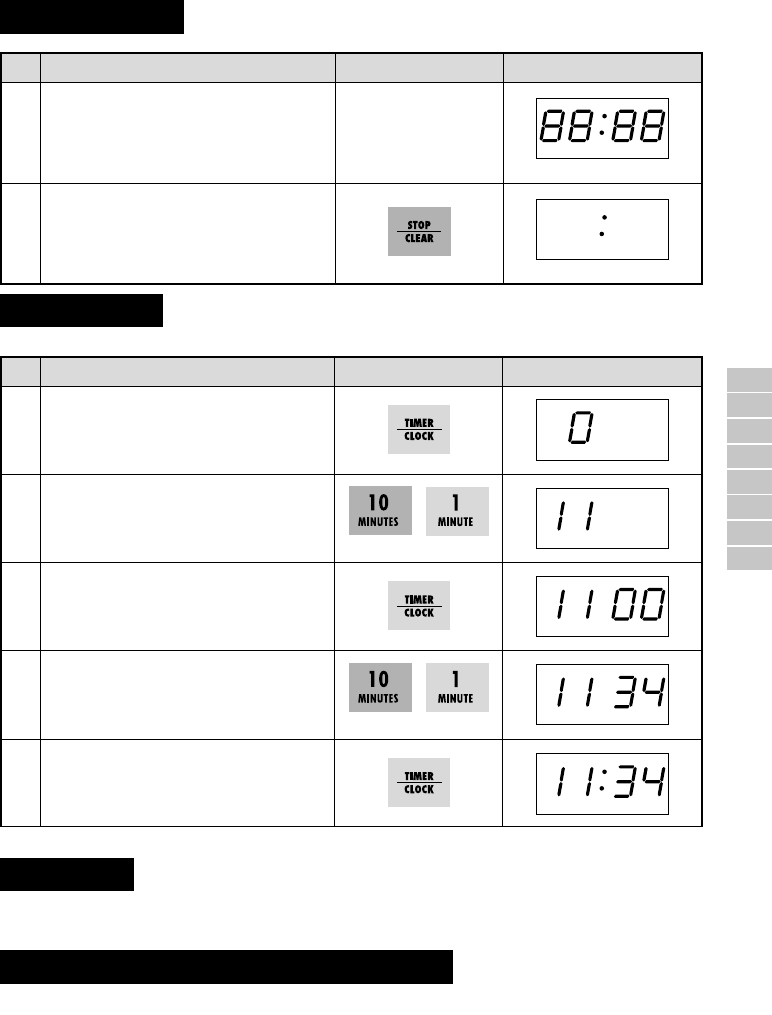
- Getting Started 7
- Clock Setting 7
- Stop/Clear 7
- MANUAL OPERATIONS 8
- AUTOMATIC OPERATIONS 10
- Auto Cook 11
- OTHER CONVENIENT FEATURES 13
- CARE AND CLEANING 14
- SERVICE CALL CHECK 14
- SPECIFICATIONS 14
- COOKING GUIDES 16
- QUICK REFERENCE GUIDE 17
- HELPFUL HINTS 18
- ( ) 19
- DEFROST MENU GUIDE 21
- CHINESE BEEF 22
- POTATO BAKE 22
- LEMON FISH FILLETS 22
- QUICK NACHOS 22
- MINI SUPREME PIZZA 23
- EASY RISOTTO 23
- CHINESE CHICKEN WINGS 23
- SAVOURY MUSHROOMS 23
- FAST CHICKEN PASTA 24
- INSTANT LASAGNE 24
- SINGAPORE NOODLES 24
Powiązane produkty i podręczniki dla Kuchenki mikrofalowe Sharp R-140D
 (8 strony)
 (24 strony)
(49 strony)
(24 strony)
(49 strony)
 (41 strony)
© 2020, manymanuals.pl. Wszelkie prawa zastrzeżone. | 0.029 s |
 Manymanuals.com
 Manymanuals.de
 Manymanuals.fr
 Manymanuals.it
 Manymanuals.pl
 Manymanuals.cz
 Manymanuals.es
 Manymanuals-pt.com
Komentarze do niniejszej Instrukcji