Sharp R-7280 Podręcznik Użytkownika Strona 167
- Strona / 229
- Spis treści
- ROZWIĄZYWANIE PROBLEMÓW
- BOOKMARKI

- Operator's Guide 1
- How to Use This Manual 2
- Introduction 3
- Introduction 4
- Conventions 5
- Conventions 6
- Contents 7
- Contents 10
- Chapter 1 Scanner Overview 15
- 1.1 Main Features 16
- 1.2 Parts and Functions 17
- Chapter 1 Scanner Overview 18
- 1.3 Turning the Power ON/OFF 25
- 1.4 Opening/Closing the ADF 27
- 1 Pull out chute extension 1 29
- 2 Pull out chute extension 2 29
- 1.7 Setting Up the Stacker 30
- 4 Lift up the stopper 32
- 2 Lift up the stopper 33
- 1 Lift up the stopper 35
- 1.8 Power Saving Mode 36
- 1 Turn on the scanner 37
- 4 Select a scanner driver 38
- 5 Select a scanner 38
- Chapter 2 How to Load 41
- Documents 41
- 2 Fan the documents 42
- 3 Close the document cover 44
- Unit Conversion 48
- Pick roller 51
- Maximum width 53
- Minimum width 53
- Side guides 53
- Narrowest document 53
- Widest document 53
- Settings 55
- Chapter 4 How to Use the 61
- Operator Panel 61
- 4.1 Operator Panel 62
- 4.2 Settings Menu 66
- 2 Press the [Menu] button 70
- 4.3 Function Selection 83
- 5.1 Summary 86
- ATTENTION 94
- 6 Attach the document cover 96
- 7 Close the document cover 96
- 5.3 Advanced Scanning 99
- 7 Click the [OK] button 101
- Chapter 6 Daily Care 108
- Chapter 6 Daily Care 109
- 6.2 Cleaning the Outside 111
- 6.3 Cleaning the Inside 112
- 2 Open the ADF 113
- 5 Reset the cleaning counter 116
- 4 Close the ADF 116
- 1 Open the document cover 117
- 4 Close the document cover 117
- Chapter 7 Replacing the 119
- Consumables 119
- 3 Remove the brake roller 121
- 6 Attach the shaft 122
- 7 Close the ADF 122
- 7.3 Replacing the Pick Roller 123
- 7 Attach the shaft 125
- 8 Close the ADF 126
- Chapter 8 Troubleshooting 127
- 8.1 Paper Jam 128
- Chapter 8 Troubleshooting 129
- 8.3 Troubleshooting 137
- 9.2 Password Setting 164
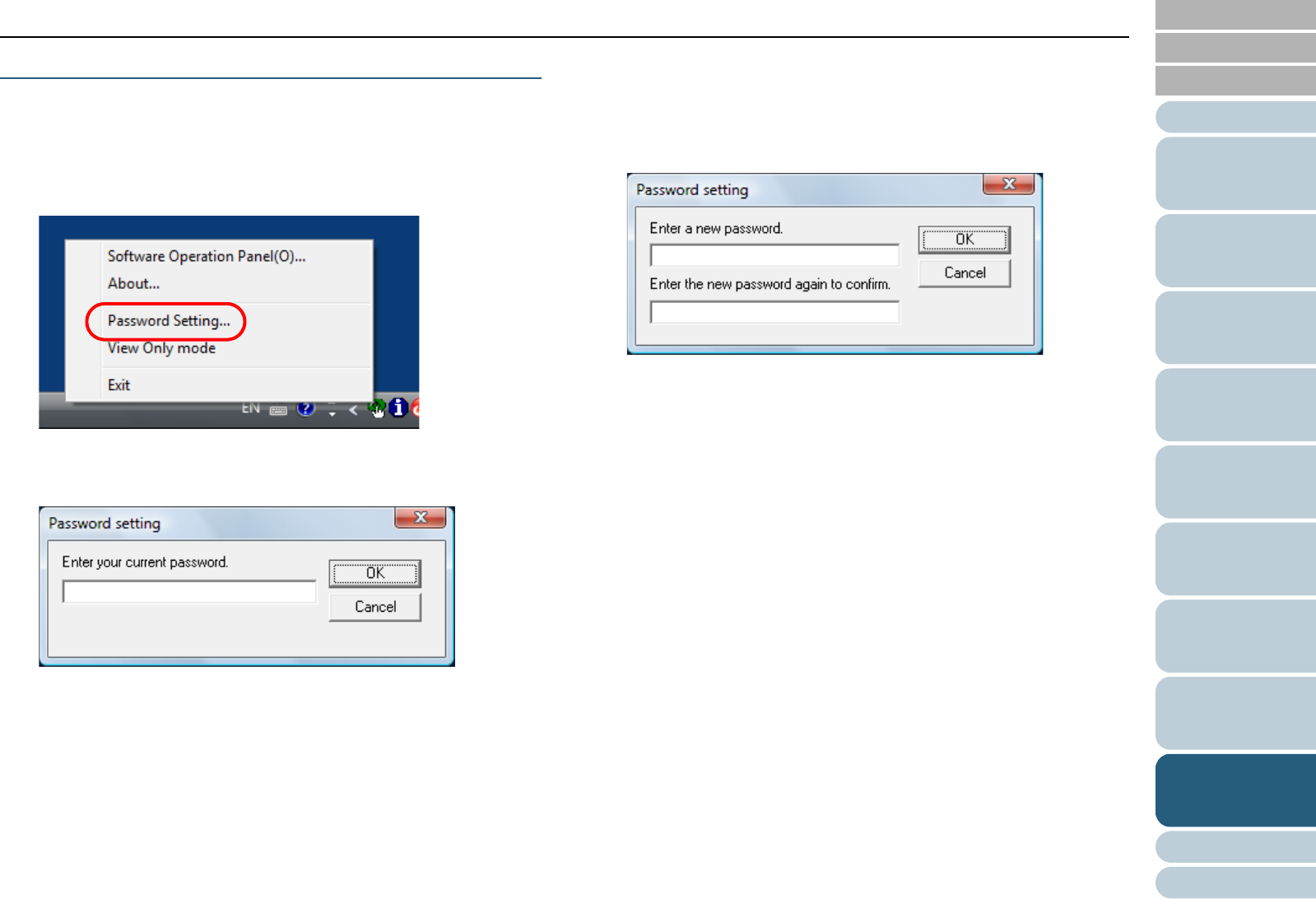
- 1 Set a password 165
- 4 Click the [OK] button 167
- 9.3 Configuration Items 170
- (page 183) 171
- 3 Click the [OK] button 179
- 3 Select a color to drop out 186
- 3 Select [Yes] or [No] 187
- 3 Click the detection method 191
- (page 163) 195
- 3 Select a detection method 196
- Feed direction 197
- 3 Specify an operation mode 200
- Appendix 207
- A.1 Basic Specification 208
- A.3 Outer Dimensions 212
- A.4 Scanner Options 214
- Glossary 216
- Glossary 217
Powiązane produkty i podręczniki dla Kuchenki mikrofalowe Sharp R-7280
 (72 strony)
(40 strony)
(74 strony)
(72 strony)
(40 strony)
(74 strony)
 (160 strony)
(40 strony)
(43 strony)
(24 strony)
(160 strony)
(40 strony)
(43 strony)
(24 strony)
© 2020, manymanuals.pl. Wszelkie prawa zastrzeżone. | 0.038 s |
 Manymanuals.com
 Manymanuals.de
 Manymanuals.fr
 Manymanuals.it
 Manymanuals.pl
 Manymanuals.cz
 Manymanuals.es
 Manymanuals-pt.com
Komentarze do niniejszej Instrukcji