NOTICE
• SHARP strongly recommends Biat separate
permanent written records be kept of alt important
data. Data may be lost or altered in virtually any
electronic memory product under certain
circumstances. Therefore. SHARP assumes no
responsibility for data lost or otherwise rendered
unusable whether as a result of Improper ige,
repairs, defects, battery replacement, use after the
specified battery life has expired, or any other
causa
tLtü lKUNlU UKUANl¿tK
Y0-P5
OPERATION MANUAL
SHARP assumes no responsibility, directly or
indirectty, forfinanciai losses or claims from third
persons resulfing from the use of this product and
any rrf its functions, such as stolen credit card
numbers, loss or alteration of stored data, etc.
The information provided in this manual is subject to
change without notice.
'PiñÑártíes
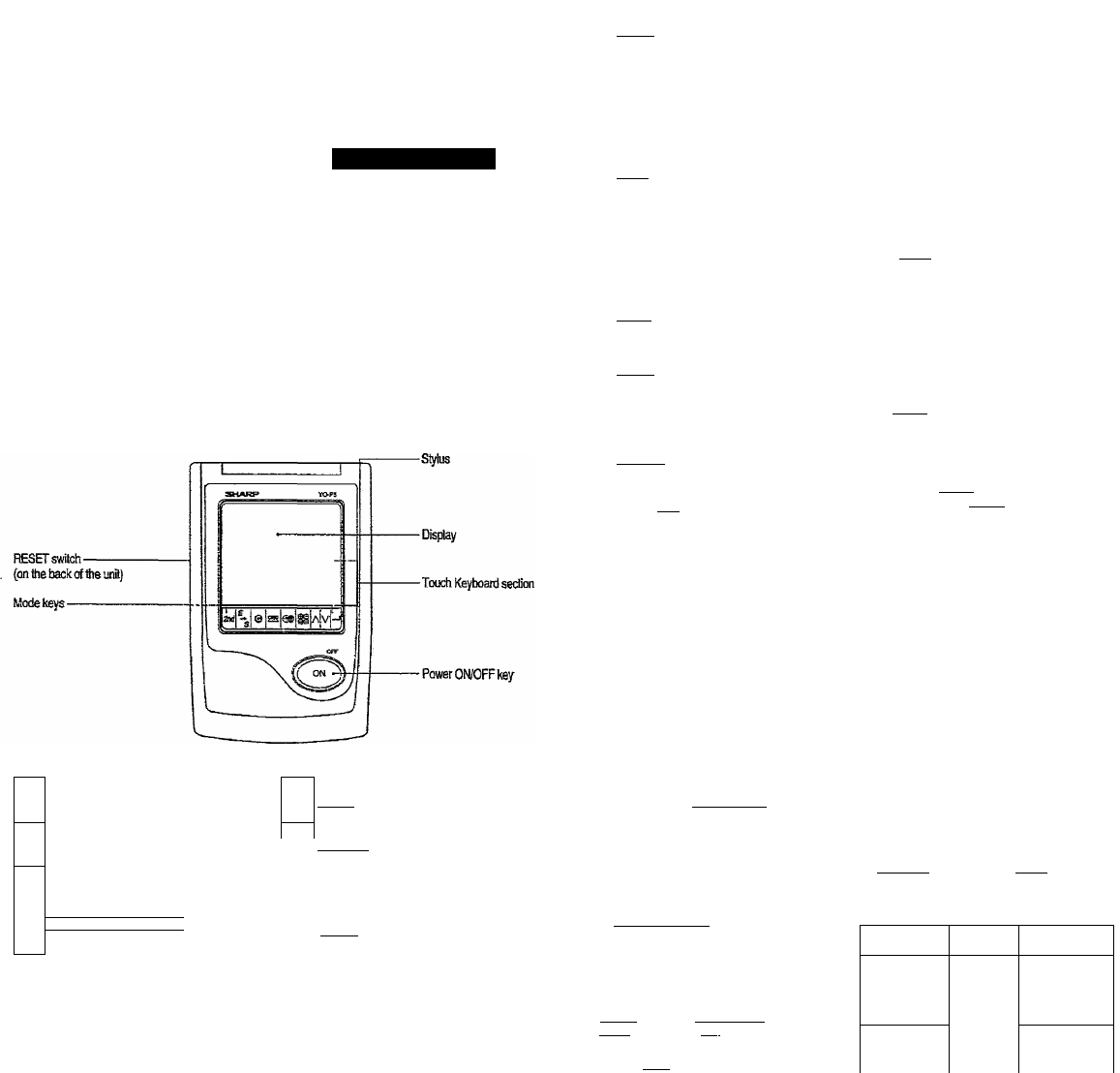
KeyAssigranents
2nd
2nd Function key
Activates the second function specificallv assigned to
the nextkey tapped.
E
s
(ii'-iKsll: English-Spanish word translator mods key
SB
BB
©
ilGAtvEl): Game mode key
É
(lTELCCHED.tjlE(W3i)!
Telephone/ScheduletMemo mode
(ICLQCKI): Horae Clock/Worid Clock mode key
(lpio:coH'<l): Calculation/Convetsion mode key
([2212]): Search keys
(iBviieHii: Enter key
»in this nranuad, these Mode keys are represented with icons in parentheses.
3. using тгш aocK
1, Tap ICLOCKi once or tvdce to display the World clock
(without
2. Tap (3 nr [v]tQ select the desired dly.
4. Changing the cities between Home
and World clacks
You can change the home city tor a city in another time
zone without acliusting the stored correct time.
1. Tap IclockI once or twice to display the World clock
(without
2. Tap 3 or ¡V] and selectthe desired city to be set
as the new home city.
3. Tap H^Si! to change the cities between Home
and World clocks.
» The previous home city is now set as the vrorld
city (without ").
4. Tap ICLQckI to check the home city.
• The selected city in step 2 is set as the home city
(with“s|e").
5. Tap ICLOCKi to recheck the world city, and tap 3
or И to select the new world city, if needed.
5. Setting daylight saving time (DST:
summertime)
B. Setting alarms
The Organizer has 3 types of alarms;
1. Daily alarm
____
__
beeps every day at the alarm
time (for 1 minute), when
“(k# is turned on.
2. Hourly alarm
_______
beeps every hour when
minutes reach. “00". when
“ 4 "isturned on.
3. Schedule alarm
_____
beeps at the time for all the
schedule entries (for 1
minute), when '•^«)'’ is
turned on. (Refer to
■■Schedule Mode".)
Tap any key to stop the alarm beeping.
Setting/Chang!ng the daily alarm time
1. Tap [clock! once or twice to dispiay Home clock
(with •‘^"),
Tap 4 to display the
daily alarm screen.
(The display difters
betiveenthe t2-hour
and 24-hour cfock.)
A LA R M
A 12 -Q 0
1. Tap ICUOCKI once or twice to display the Home ortiie
World clock.
2. Tap SSI.
“jT is displayed. The time is set 1 hour ahrad. To
clear DST, tap to clear The time Is set 1
hour behind.
N o te s
• DST can be set independently in either Home or
World clock.
• When DST is set for one world city, it is used for all
• cities (fisplayed in World clock.
3.
4. Enterthetime.
5. Tanter-nfcñl.
• The daily alarm time is set.
Turning tha alarms on and oil
An alarm sounds only when the respective symbol
(ÍN), 4, or® 4) is turned on.
Display Home clock (lap IO-OCkI once or twice) and tap
4 to display the daily alarm screen.
Each time you tap 4 while the daily alarm screen is
displayed, the combination of symbols switches.
Note
• Alarms sound even when the Organizer is turned off.
Telephone mode is composed of two directions of
storage memory. Tap ITELSCHEP.'raEMSl to select''!" and
'■2’'onthedispiay-
Use these files lor convenience, e.g. business
and private files.
A telephone entry consists of name, address.
E-mail address, wab address (URL) and number fields.
Storing telephone entries
N U M B E H ?
2 -3 4 5 6 -78 9 0
3 4 56 -78 9 1^
NAME?
1. Tap ITELSCHECVVIBVIOI
several times to display
the Telephone mode
screen.
2. Enter name. e.g- SMtTH Isp^ ROBERT, and tap
6. Enter phone number;
and fax number if
needed. e.g.
012-3456-7890 3
I^fSESB is!'--c£i
IspAcei !5idl 3456-7891. and tanie-iTHi'i
• "STORED!" appears briefly, then tlie Telephone mode
screen is displayed. The telephone entry is now
stored.
3. Enter address, e.g. lail 18 IspaceI liridl EAST
ISPACEl rOad. and tap enter!.
4. Enter E-mail address,
e.a.SRD8lSM8u!gl
‘‘harpsec. com_
Field
Number ot
characters
Allowable
chacacteis
The 1st line:
Marne, address.
E-mail address
and web address
(URL)
3S characters
or under
Alphabetic let
ters. numbers,
symbols. "+-X i-
space
The 2nd and the
3rd lines;
Phone nuinber
Numbers, space,
- F (Fax). P
(Pager)

 (43 strony)
 Manymanuals.com
 Manymanuals.de
 Manymanuals.fr
 Manymanuals.it
 Manymanuals.pl
 Manymanuals.cz
 Manymanuals.es
 Manymanuals-pt.com
Komentarze do niniejszej Instrukcji