Sharp 27F640 Dokumentacja Strona 7: Part Names
 1
 2
 3
 4
 5
 6
 7
 8
 9
 10
 11
 12
 13
 14
 15
 16
 17
 18
 19
 20
 21
 22
 23
 24
 25
 26
 27
 28
 29
 30
 31
 32
 33
 34
 35
 36
 37
 38
 39
 40
 41
 42
 43
 44
 45
 46
 47
 48
 49
 50
 51
 52
 53
 54
 55
 56
 57
 58
 59
 60
 61
7
Dimension: 140mm x 215mm
Quick Reference Control OperationQuick Reference Control Operation
Note:
• The TV set and remote control illustrations and the on-screen displays in this manual may differ from their actual
appearance.
• The TV set illustrations on this page and after are those of 32F640.
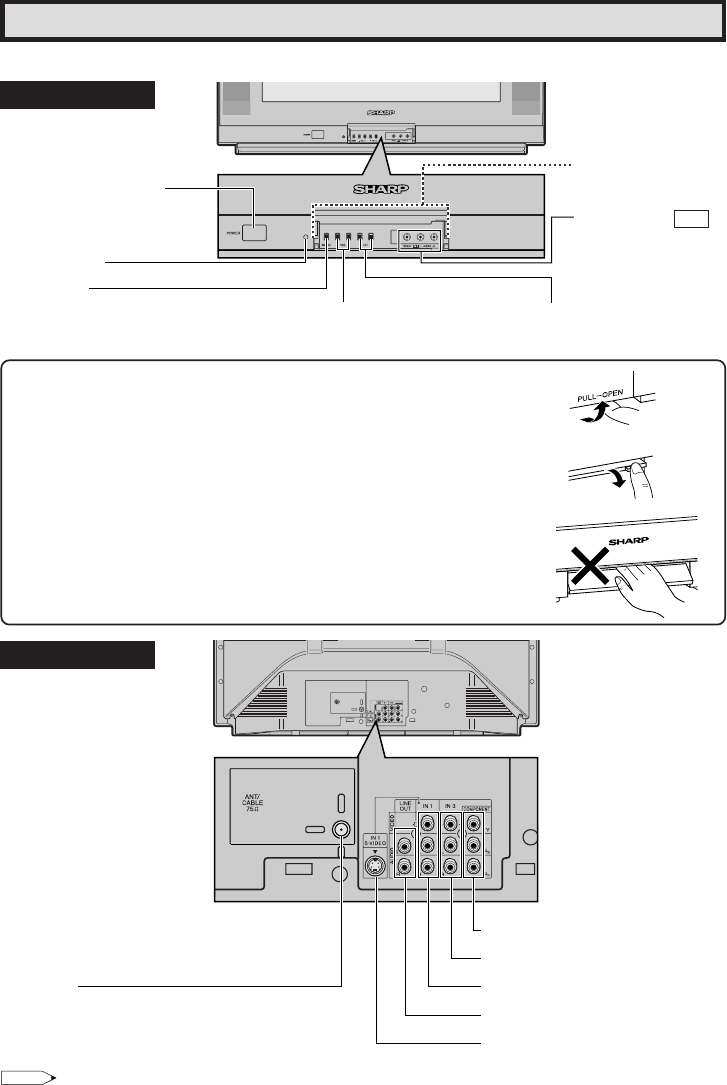
To open the door
Using the projection located under the "PULL-OPEN" indication,
pull and lift the door open.
To close the door
Using the projection, lower the door until closed.
Caution:
• When opening or closing the door, do not insert your fingers into
the gap between the door and front panel. This may result in an
injury.
Rear Panel
ANTENNA/CABLE INPUT
TERMINAL
COMPONENT (VIDEO) TERMINALS
IN 3 (VIDEO/AUDIO) TERMINALS
•
Part Names
Front Panel
VIDEO/AUDIO
TERMINALS
IN 2
CHANNEL UP/DOWN
(a) Selects next higher channel.
(s) Selects next lower channel.
POWER
Press → On.
Press again → Off.
MENU
Press → Accesses MAIN MENU.
Press again → Exits MAIN MENU.
INSIDE DOOR
VOLUME UP/DOWN
(k) Increases sound.
(l) Decreases sound.
IN 1 (VIDEO/AUDIO) TERMINALS
LINE OUT (AUDIO) TERMINALS
IN 1 S-VIDEO TERMINAL
REMOTE CONTROL
SENSOR
27/32F640(07-08) 03.10.8, 9:23 AM7
Plik PDF · ·
Pytania o Sharp 27F640
Nie ma jeszcze pytań o tę instrukcję. Zadaj pierwsze.
Powiązane produkty i podręczniki dla Telewizory CRT Sharp 27F640
- Telewizory CRT Sharp 27F541 Instrukcja Obsługi
 (35 stron)
- Telewizory CRT Sharp 13L-M150B Instrukcja Użytkownika
(4 strony)
- Telewizory CRT Sharp 36C530 Instrukcja Obsługi
(34 strony)
- Telewizory CRT Sharp 32F543 Instrukcje Operacyjne
(47 stron)
- Telewizory CRT Sharp 27F631 Instrukcja Obsługi
(36 stron)
- Telewizory CRT Sharp 32UF5 Instrukcja Obsługi
(42 strony)
- Telewizory CRT Sharp 32UF5 Instrukcja Użytkownika
(57 stron)
- Telewizory CRT Sharp 32C230 Instrukcja Użytkownika
(52 strony)
- Telewizory CRT Sharp 27C240 Instrukcja Użytkownika
(45 stron)
- Telewizory CRT Sharp MX-3610N Instrukcja Użytkownika
 (2 strony)
- Telewizory CRT Sharp MX-2610N Instrukcja Użytkownika
(2 strony)