Sharp MX-M950 Instrukcja Użytkownika Strona 48
- Strona / 52
- Spis treści
- BOOKMARKI

- Maintenance Guide 1
- Please note 2
- TABLE OF CONTENTS 3
- REGULAR MAINTENANCE 4
- X Front side of original 5
- X Reverse side of original 5
- X MX-MFX1 6
- X MX-MFX2 6
- DISCARDING PUNCH WASTE 7
- Open the cover 8
- Replace the staple waste box 8
- CONTAINER 9
- REPLACING SUPPLIES 10
- REPLACING THE TONER CARTRIDGE 11
- FINISHER 12
- SADDLE UNIT 13
- Install the staple case 14
- Push in the unit 14
- Close the cover 14
- Saddle stitch section 15
- Staple section 15
- REPLACING THE STAMP CARTRIDGE 17
- REMOVING MISFEEDS 18
- X Stapler section 24
- X Output trays 26
- X Inside 26
- Remove the misfed paper 29
- FOLDING UNIT 30
- INSERTER 32
- X Transport area 33
- THE MACHINE 35
- X Transport unit 36
- ☞ Transport area (page 37) 40
- X Bypass tray (MX-MFX2) 41
- X Bypass tray (MX-MFX1) 45
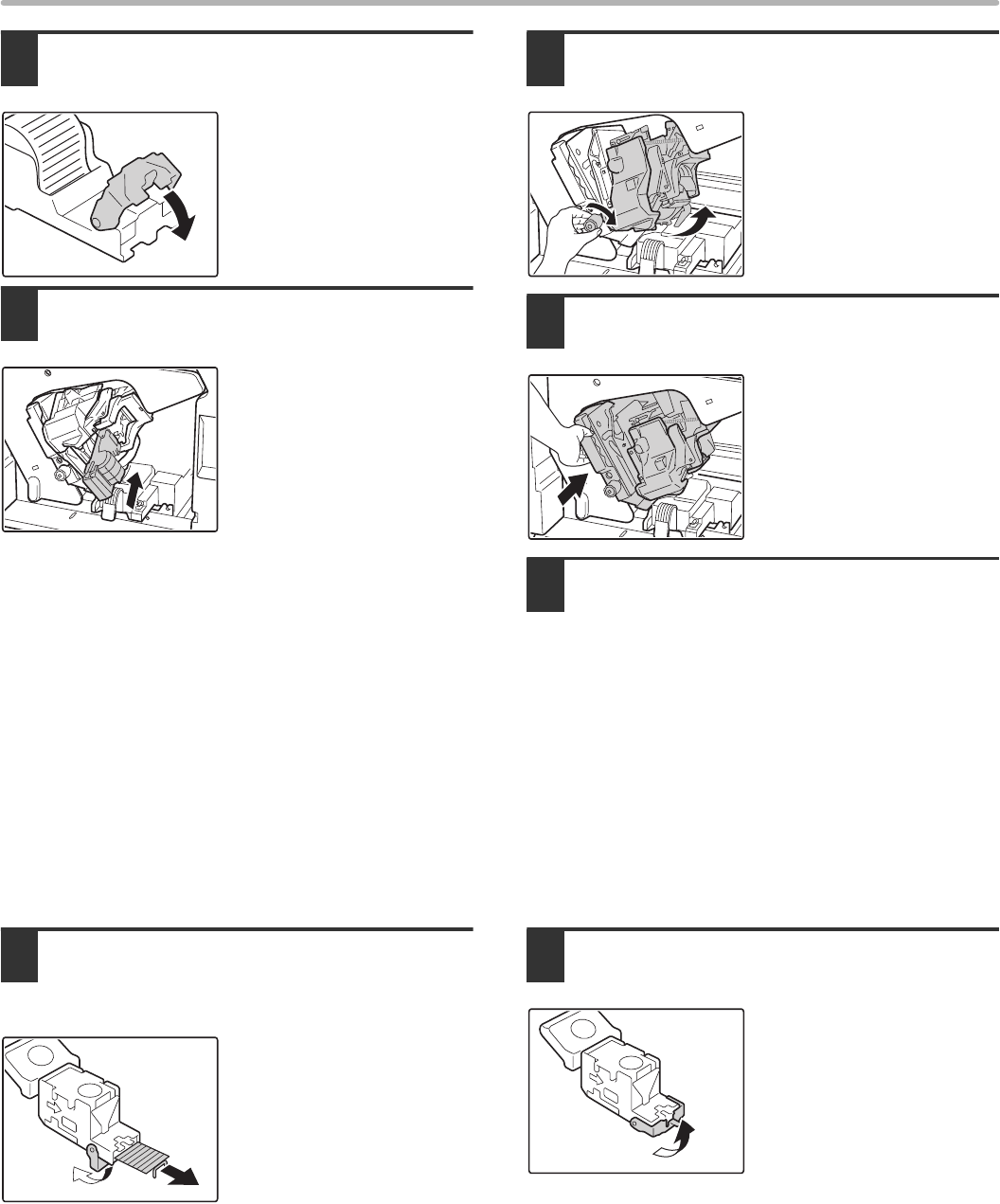
- REMOVING STAPLE JAMS 47
- STITCH FINISHER 48
- MAINTENANCE HISTORY 49
- PRINTED IN FRANCE 52
- TINSE3773GHZZ 52
Powiązane produkty i podręczniki dla Kopiarki Sharp MX-M950
 (67 strony)
(109 strony)
(28 strony)
(91 strony)
(84 strony)
(120 strony)
(56 strony)
(160 strony)
(88 strony)
(24 strony)
(28 strony)
(178 strony)
(113 strony)
(108 strony)
(67 strony)
(109 strony)
(28 strony)
(91 strony)
(84 strony)
(120 strony)
(56 strony)
(160 strony)
(88 strony)
(24 strony)
(28 strony)
(178 strony)
(113 strony)
(108 strony)
 (66 strony)
(84 strony)
(66 strony)
(84 strony)
© 2020, manymanuals.pl. Wszelkie prawa zastrzeżone. | 0.017 s |
 Manymanuals.com
 Manymanuals.de
 Manymanuals.fr
 Manymanuals.it
 Manymanuals.pl
 Manymanuals.cz
 Manymanuals.es
 Manymanuals-pt.com
Komentarze do niniejszej Instrukcji