Sharp MX-M363N Instrukcja Konfiguracji Strona 9

  • Pobierz
  • Dodaj do moich podręczników
  • Drukuj
Przeglądanie stron 8
7
CONNECTING THE MACHINE
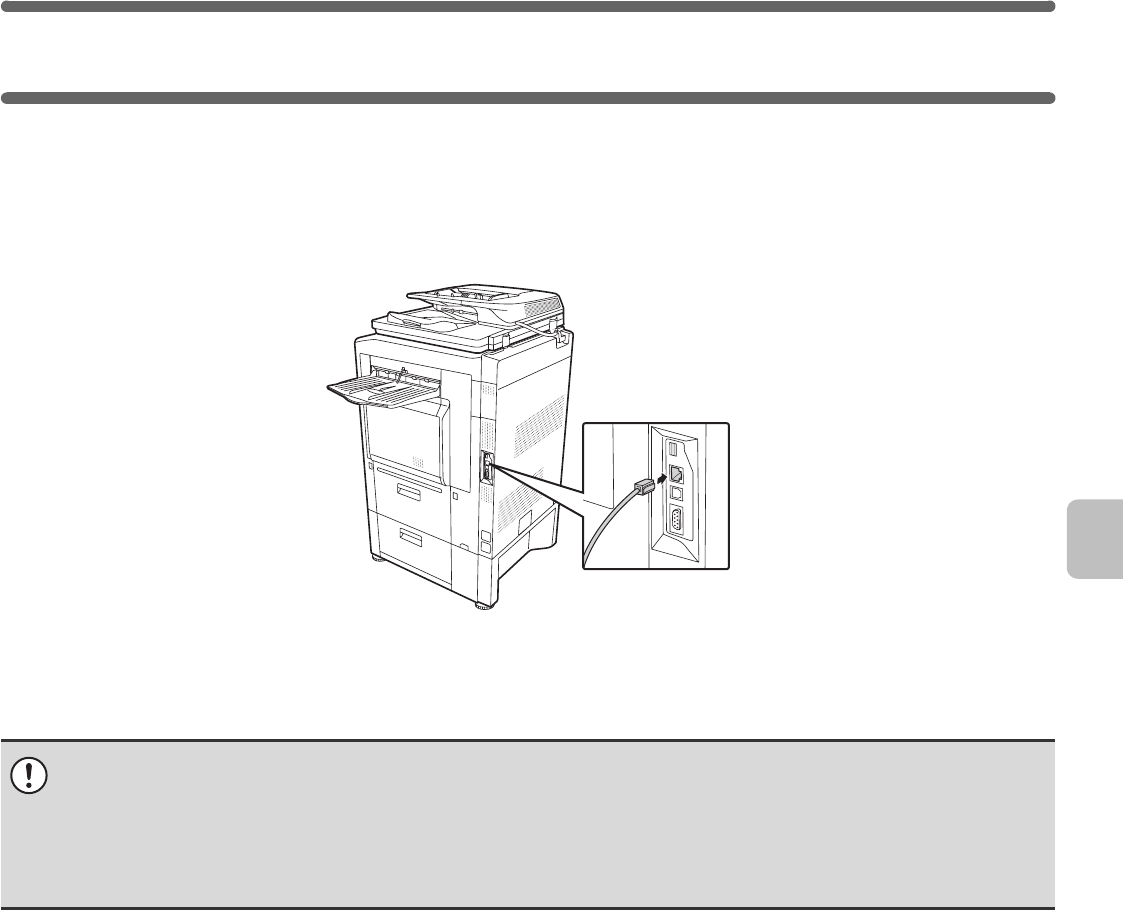
CONNECTING TO A NETWORK
To connect the machine to a network, connect the LAN cable to the machine's network connector. Use a shielded LAN
cable.
After connecting the machine to a network, be sure to configure the IP address and other network settings before
installing the software. (The factory default setting for the IP address is to receive the IP address automatically when the
machine is used in a DHCP environment.)
Network settings can be configured using "Network Settings" in the system settings (administrator) on the machine.
X Checking the IP address of the machine
You can check the IP address of the machine by printing out the "All Custom Setting List" in the system settings. Follow
these steps to print out the "All Custom Setting List".
Press the [SYSTEM SETTINGS] key, touch the [List Print (User)] key, and then touch the [Print] key of "All Custom
Setting List".
CONNECTING THE MACHINE WITH A USB CABLE
(Windows)
The machine can be connected to a computer using a USB cable if the computer is a Windows computer. (The USB
interface on the machine cannot be used in a Macintosh environment.)
The machine and computer should be connected while the printer driver is being installed. If a USB cable is connected
before the printer driver is installed, the printer driver will not be installed correctly. For the procedure for connecting a
USB cable, see "WHEN THE MACHINE WILL BE CONNECTED WITH A USB CABLE" (page 16).
If the machine is used in a DHCP environment, the IP address of the machine may change. If this happens, printing will not
be possible. This problem can be avoided by using a WINS server or by assigning a permanent IP address to the machine.
This manual explains how to set up the software in a Windows network environment and in a Macintosh network
environment.
To use the machine on an IPv6 network, the IPv6 setting must be enabled in "Network Settings" in the system settings
(administrator).
!mxm503_us_ins.book 7 ページ 2009年1月22日 木曜日 午後2時21分
Przeglądanie stron 8
1 2 3 4 5 6 7 8 9 10 11 12 13 14 ... 47 48

Komentarze do niniejszej Instrukcji

Brak uwag

Philips SWV2510/10 manuály

Uživatelské manuály a uživatelské příručky pro Kompozitní video kabely Philips SWV2510/10.
Poskytujeme 1 manuály pdf Philips SWV2510/10 ke stažení zdarma podle typů dokumentů: Datový list


Další produkty a příručky pro Kompozitní video kabely Philips

Modely Typ Dokumentu
SWV3212W/27 Datový list   Philips SWV3212W 6 ft Composite A/V cable, 2 stránky
SWV3212W/10 Datový list   Philips Composite A/V cable SWV3212W, 2 stránky
SWV2223W/10 Datový list   Philips Composite video cable SWV2223W, 2 stránky
SWV2534W/10 Datový list   Philips Composite A/V cable SWV2534W, 2 stránky
SWV3214W/10 Datový list   Philips Composite A/V cable SWV3214W, 2 stránky
SWV3532/10 Datový list   Philips 1.5 m Stereo Audio Composite A/V cable, 2 stránky
SWV2510T/10 Datový list   Philips Composite video cable SWV2510T, 2 stránky
SWV2532/10 Datový list   Philips Composite A/V cable SWV2532, 2 stránky
SWV2120NB/97 Datový list   Philips SWV2120NB 1,5 m Composite video cable, 2 stránky
SWV3214W/27 Datový list   Philips SWV3214W 12 ft Composite A/V cable, 2 stránky
SWV3532NZ/97 Datový list   Philips SWV3532NZ 1,5 m Stereo Audio Composite A/V cable, 2 stránky
SWV2533/10 Datový list   Philips SWV2533 3.0 m 3.5 mm (M) Composite A/V cable, 2 stránky
SWV3510/10 Datový list   Philips Composite video cable SWV3510, 2 stránky
SWV2133/93 Datový list   Philips SWV2133 3.0 m Composite video cable, 2 stránky
SWV2215W/10 Datový list   Philips Composite AV cable kit SWV2215W, 2 stránky
SWV2212W/27 Datový list   Philips SWV2212W 6 ft Composite A/V cable, 2 stránky
SWV3212S/10 Uživatelský manuál   Philips SWV3212S/10 User manual, 1 stránky
SWV7532S Manuál     Philips SWV7532S/10 Manuel utilisateur, 1 stránky