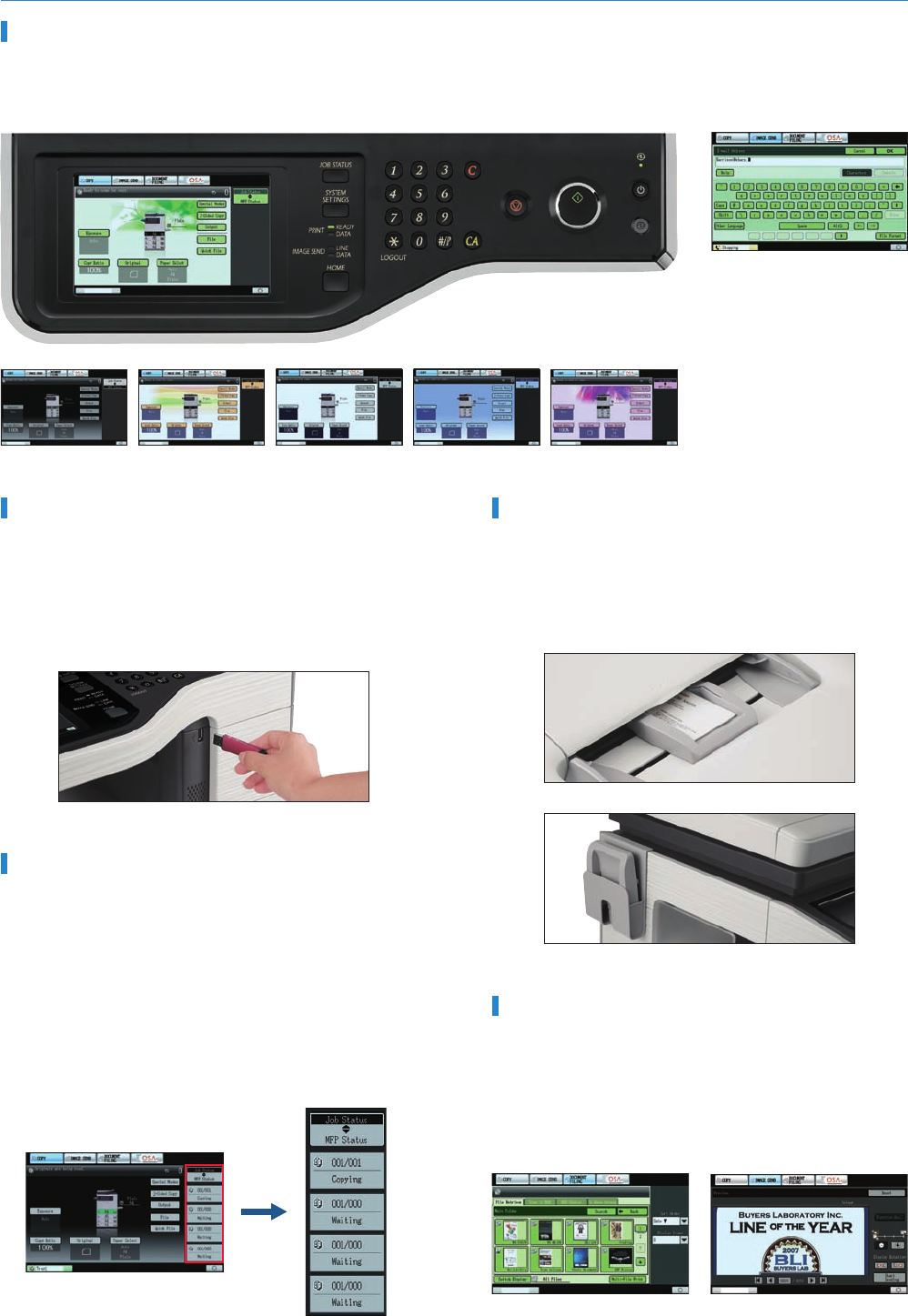
Job status
QWERTY keyboard screen
Thumbnail display Preview display
Macintosh
Ethernet
(10Base-T/100Base-TX/1000Base-T)
Print
Windows®
Windows Server®
38
CPM
PPM
43
USB Memory-Ready
The MX-B382 offers a whole new level of convenience with two
USB ports. One of those ports is located at the front of the MFD
right beneath the control panel. It comes in handy when scanning
documents directly to USB memory devices or printing data directly
from USB memory devices—an indispensable function for users
who are in a hurry or who want quick machine access without a PC.
Job Status Screen
• Whether printing or copying, the MX-B382’s control panel
displays a list of all jobs, showing you at a glance the jobs in
progress and the position of your job in the queue. With a few
quick touches of the LCD screen, the Priority Printing function
lets you easily change the job queue order or delete jobs that are
no longer needed.
• On the right side of the LCD, you will find a simplified version of
the Job Status display. This lets you quickly confirm the first four
jobs in the queue without having to go to the Job Status screen.
The display also provides a quick rundown on MFD system
status.
Thumbnail Display and Previews
Making the search for files easier and more convenient than ever,
thumbnails and up-close previews of Document Filing data files, as
well as conventional file names, can be displayed on the
MX-B382’s LCD control panel. To help users decide which
documents to print out, the LCD can also display thumbnails and
previews of incoming faxes and Internet faxes.
Business Card Feeder
The optional Business Card Feeder automatically feeds in and
scans business cards and can be used with commercially available
business card scan software to create business card databases. A
pocket on the left side of the MFD provides handy storage of the
Business Card Feeder.
7.0-Inch Touch-Screen LCD
The MX-B382’s logically designed control panel features a wide, clear, W-VGA-resolution touch-screen LCD with a choice of six screen colours.
Pushing the Home button, even in the middle of an operation, takes you back to the Start screen. You can quickly access the most frequently
used functions and settings by programming them into My Menu.
FULL-FUNCTION EASEPRODUCTIVE PERFORMANCE
Full-Colour Network Scanning
• The MX-B382 works as a full-colour network scanner that
can be used with any Windows PC on the network. It supports
TIFF, PDF, encrypted PDF, JPEG, and XPS (XML Paper
Specification) file formats.
• Auto Colour Selection automatically determines whether a
page is colour or B/W and selects the appropriate scan mode for
that page. Auto Colour Mode analyses the contents of each
page, distinguishing between different components, such as
photos and text. The MX-B382 can scan maps with crisp, clear
text and automatically remove the background colour on
newspaper and magazine articles for clearer scanning.
Multiple Distribution of Scanned Files
With the touch of a few buttons, you can choose different ways to
distribute your scanned documents. Scan to E-mail sends
documents as an e-mail attachment. Scan to FTP Server scans
documents directly to an FTP server for storage. Scan to Desktop
sends scanned documents directly to your PC desktop. Scan to
Network Folder (SMB) sends files to a shared folder on a
networked Windows PC. Scan to USB Memory scans documents
directly to USB memory devices. Scan to Fax enables conventional
faxing or Internet faxing.
High-Speed Faxing
The optional MX-FXX3 Fax Expansion Kit turns the MX-B382 into a
33.6 Kbps Super G3 fax. Using JBIG compression technology, the
MX-B382 can send an A4 size page in under 3 seconds*. Use the
50-sheet RSPF to further boost faxing efficiency. Additionally
Quick On-Line Transmission can start dialling and transmitting
as soon as the first page is scanned into memory, you can send
documents in less time.
* Based on Sharp’s standard chart with approximately 700 characters (A4) at
standard resolution.
Built-in Stackless Duplex Module
The built-in stackless duplex module on the MX-B382—
particularly effective when used with the RSPF—reduces paper
costs and saves filing space by making two-sided copies and
printouts.
Quick Scanning and RSPF
With a scanning speed of 33 opm* (originals per minute) the
MX-B382 can complete large scan jobs with ease and efficiency.
The standard-equipped 50-sheet RSPF (reversing single pass
feeder), which smoothly feeds in both one and two-sided
originals, brings added efficiency.
* A4 size, single-side feeding. 35 opm for letter size
Supports Most Office Environments
The MX-B382 works as a network printer with the latest and most
commonly used operating systems and network protocols,
including IPv6, and even in mixed OS environments. With a 64-bit,
800 MHz CPU, you get fast, powerful network printing via the
1000Base-T Gigabit Ethernet standard.
Space-Efficient Inner Finisher
The MX-B382’s optional inner
finisher can be added on without
taking up much space. It automates
time-consuming tasks, such as
sorting and stapling* documents of
up to 30 pages, and stacks each job
slightly apart from the previous one
(offset stacking) for easy retrieval.
* For one-corner stapling only
Large Paper Capacity
The MX-B382 comes standard with a 500-sheet paper tray and a
100-sheet multi-bypass feeder. Two types of extra paper drawers
are available for a total paper
capacity of up to 2,100 sheets.
When a tray runs out of paper,
the Auto Tray Switching
function automatically switches
to another paper tray filled with
the same size paper.
Super-Efficient Output
The MX-B382 delivers a fast output of 38 cpm/ppm* and the
first copy comes out in just 8.0 seconds. What’s more, its
short, straight paper path minimises misfeeds to
save you paper and toner costs.
* A4 size (40 cpm/ppm)

 (80 strony)
 (148 strony)


 Manymanuals.com
 Manymanuals.de
 Manymanuals.fr
 Manymanuals.it
 Manymanuals.pl
 Manymanuals.cz
 Manymanuals.es
 Manymanuals-pt.com
Komentarze do niniejszej Instrukcji