Sharp MX-2300N Przewodnik Szybki Start Strona 47
- Strona / 88
- Spis treści
- BOOKMARKI

- Quick Start Guide 1
- Printed manuals 2
- Manuals in PDF format 3
- Opening the Web pages 4
- Checking the IP address 4
- TABLE OF CONTENTS 6
- Document filing 7
- System settings 7
- General information 9
- PART NAMES AND FUNCTIONS 10
- Interior 11
- Peripheral devices 11
- OPERATION PANEL 12
- USING THE TOUCH PANEL 14
- USER AUTHENTICATION 15
- PLACING ORIGINALS 16
- CHANGING PAPER IN A TRAY 17
- Changing the tray settings 18
- Names of the trays 19
- Other trays 20
- MAKING COPIES 22
- (3) Touch the [OK] key 23
- Place the originals 24
- Selecting a tray 25
- SELECTING THE EXPOSURE MODE 26
- Place the original 27
- & WHITE START] key 28
- ENLARGEMENT/REDUCTION 29
- (Preset Ratios / Zoom) 29
- INTERRUPTING A COPY RUN 31
- (Interrupt Copy) 31
- STORING COPY OPERATIONS 32
- (Job Programs) 32
- Calling up a job program 33
- Deleting a job program 33
- (4) Touch the [Exit] key 34
- SPECIAL MODES 35
- SELECTING A SPECIAL MODE 36
- CONVENIENT COPY FUNCTIONS 37
- Original Tab paper 39
- Planning Meeting 40
- Green G+ 41
- CCyan+ MMagenta+ 42
- Y Yellow+ K 42
- K Black+Black+ 42
- (Mixed Size Original) 43
- Printing 45
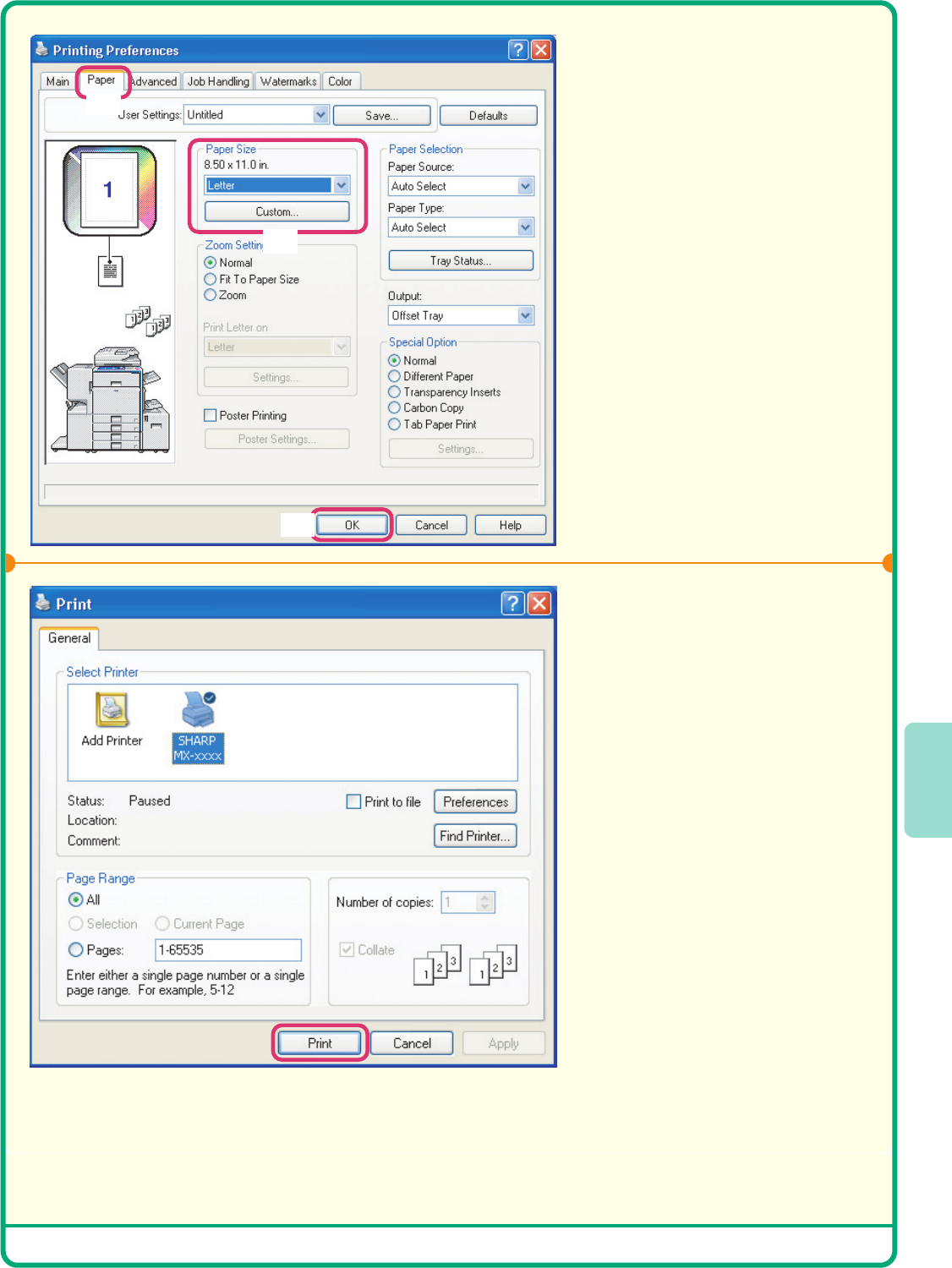
- PRINTING 46
- Select print settings 47
- Click the [Print] button 47
- CANCELING A PRINT JOB 48
- USING PRINTER DRIVER HELP 49
- PRINTER DRIVERS 50
- Open the printer driver 51
- CONVENIENT PRINTER FUNCTIONS 52
- (Black and White Print) 53
- PRINTING FROM A MACINTOSH 54
- Printing a file 55
- Scanning 57
- NETWORK SCANNER FUNCTION 58
- SCANNING AN ORIGINAL 59
- Cancel scanning 60
- CHANGING THE RESOLUTION 61
- SELECTING THE EXPOSURE AND 62
- EXPOSURE MODE 62
- CHANGING THE FILE FORMAT 63
- STORING A DESTINATION 64
- Storing a group key 65
- (Continued) 66
- One-touch key 68
- Resending 68
- Speed sending 69
- SPECIAL SCAN MODES 70
- SCANNER FUNCTION 71
- [COLOR START] key 72
- CONVENIENT SCANNER FUNCTIONS 73
- DOCUMENT FILING 76
- QUICKLY SAVING DOCUMENT DATA 78
- (Quick File) 78
- APPENDING INFORMATION WHEN 79
- STORING A FILE (File) 79
- ONLY SAVING DOCUMENT DATA 81
- (Scan to HDD) 81
- PRINTING A SAVED FILE 82
- SYSTEM SETTINGS 84
- Please note 87
- QQuick Start GuideQ 88
Powiązane produkty i podręczniki dla Kopiarki Sharp MX-2300N
 (8 strony)
(116 strony)
(200 strony)
(8 strony)
(12 strony)
(12 strony)
(120 strony)
(24 strony)
(84 strony)
(2 strony)
(44 strony)
(80 strony)
(8 strony)
(8 strony)
(8 strony)
(2 strony)
(2 strony)
(46 strony)
(8 strony)
(116 strony)
(200 strony)
(8 strony)
(12 strony)
(12 strony)
(120 strony)
(24 strony)
(84 strony)
(2 strony)
(44 strony)
(80 strony)
(8 strony)
(8 strony)
(8 strony)
(2 strony)
(2 strony)
(46 strony)
© 2020, manymanuals.pl. Wszelkie prawa zastrzeżone. | 0.032 s |
 Manymanuals.com
 Manymanuals.de
 Manymanuals.fr
 Manymanuals.it
 Manymanuals.pl
 Manymanuals.cz
 Manymanuals.es
 Manymanuals-pt.com
Komentarze do niniejszej Instrukcji