3 4
20
PPM
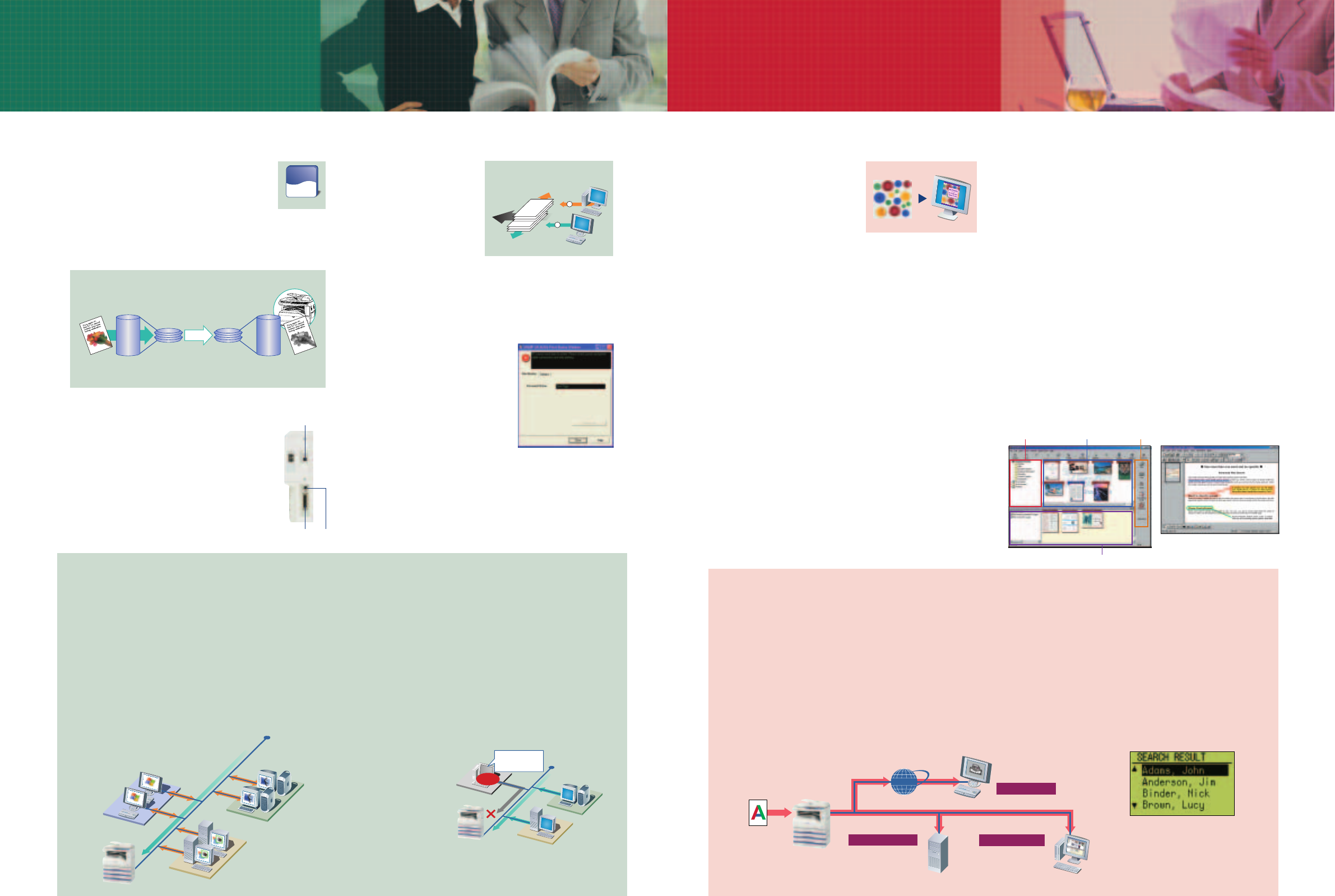
SPLC (Sharp Printer Language with Compression) Printing
Compress print data, reduce transfer time
Host-based
print data
Data is
compressed
Transfer
Decompressing
Transfer time reduced by
nearly half (vs. host-based)
Fast printing of text and graphics
USB 2.0 (with AR-EB9)
USB 1.1IEEE 1284
1
2
A
B
Won’t get
mixed!
A’s printout
B’s printout
with AR-EB9
Easy Retrieval of Your Print Jobs
Printer Status Window
NO!
Windows®
Ethernet
(10Base-T/100Base-TX)
Macintosh
Unknown IP or MAC
addresses will be
denied access
Macintosh
Windows® 95/98/Me
Windows NT® 4.0
Windows® 2000/XP
Ethernet
(10Base-T/100Base-TX)
Print
Scan objects with uneven surfaces...
...and put them in your documents
Folder window View/work area Output zone
Composer
Annotation function
Internet
Client PCs
Scan to desktop
Send to
designated PC
Send as e-mail
attachment
Scan to e-mail
Scan
Document
File server
Store and share
as digital data
Scan to FTP server
LDAP search results
A3 Full-Colour Scanning
The AR-M206 lets you easily scan
colour originals in 600 x 600 dpi
resolution and use them to create
vivid, impressive colour documents
or presentation materials. The
optional 40-sheet RSPF or SPF gives
efficient multi-page document scanning. The AR-M206’s high-
quality colour CCD with wide depth of focus gives you clear, full-
colour scanning of originals with uneven surfaces*, such as fabric
and documents with other paper pasted on top. This means more
creative possibilities and more ways to communicate accurately
and effectively.
*There are limits (height, width, and depth) to uneven-surface objects that
can be scanned.
Push and Pull Scanning
Operation is quick and easy — simply press the Scan button, select
an application, and press Start (push scan). Up to six pre-
registered applications are available, including Sharpdesk™, e-
mail*, Microsoft
®
Word*, OCR*, and fax*. Button Manager
software allows you to change/assign these destination
applications and scan settings. The AR-M206’s scanner driver is
also compatible with the TWAIN standard, allowing it to be used
with various TWAIN-compliant applications (pull scan).
*These applications require additional software.
Sharpdesk™ — Document Management on
Your PC
Sharpdesk™ is an original Sharp application that provides
integrated desktop management of documents in over 200 file
formats, including scanned paper-based documents and those
created with popular applications such as Word. It allows you to
organise, edit, search, and distribute your documents, all with
simple drag-and-drop operation.
• Intuitive desktop display features thumbnail viewing
• Sharpdesk Imaging provides annotation tools for paper-free
proofreading
• Sharpdesk Composer combines different types of files into a
single document
• Optical character recognition converts documents into
editable text files
• Output zone distributes files to e-mail, printers, and other
applications
• File search allows searching by file name, keyword, or thumbnail
Note: Sharpdesk is not compatible with Windows
®
95 and Windows NT
®
4.0 (Service Pack 5.0).
COLOUR SCANNING
COLOUR SCANNING
Speedy Printing with Sharp Technology
The AR-EB9 Dual Function Board brings the
AR-M206 the power of Sharp Printer Language
with Compression (SPLC) printing. SPLC effectively
reduces the data size of print jobs, speeding up the
data transfer time and printing process while improving overall
throughput. The AR-EB9 also provides RIP Once/Print Many
(ROPM) memory for efficient processing. Documents are output at
a quick rate of 20 ppm (A4 size) in 600 dpi resolution.
Smart Sharing
The AR-M206’s Smart Sharing function allows you
to connect multiple computers directly to the
machine without having to go through a network.
This is great news for small workgroups that need
to share the unit with only a few PCs and don’t
have a LAN set up in their office. One USB 1.1 port
and one IEEE 1284 port are provided as standard,
and a USB 2.0 interface can be added with the
AR-EB9 for a total of three PC connections.
Powerful Network Printing
The AR-M206 can be optionally upgraded into a network printer
that supports TCP/IP, IPX/SPX, NetBEUI for Windows, and
Macintosh EtherTalk, enabling your entire office to benefit from
powerful network printing. PCL 6/5e printer language emulations
are also provided. For compatibility with more fonts and better
graphics handling, PostScript 3 emulation is available with the
optional AR-PK1N PS3 Expansion Kit.
Job Offset and Job Separator
The AR-M206 ensures your
documents will stay neatly
organised even when others
are sharing the machine. To
make it easier to locate and
retrieve your documents from
the tray, the AR-M206’s Job
Offset function stacks each
print job slightly shifted apart from one another. In addition, the
optional AR-TR4 Job Separator Tray Kit lets you send printer
output to the Job Separator tray or beneath it, preventing your job
from getting mixed in with copies and faxes.
Printer Status Window
A Printer Status Window conveniently
allows you to monitor important printer
information on your PC, including on-
line/off-line status, name of the active
print job, and machine conditions such
as the amount of paper or toner.
Other Key Features
• Standard host-based printing at max. 12 ppm
• N-up, Fit-to-Page, watermarks
• Duplex printing
Network Utility Software
Sharp’s original Printer Administration Utility software makes
printer networks easier to manage by allowing network
administrators to customise monitored items and view settings such
as the IP address directly from their PC. And with the Printer
Status Monitor, network PC screens can display printer conditions,
such as toner levels and whether there is any paper remaining.
IP/MAC Address Filtering for Security
The IP/MAC address filtering function provides highly secure
operation by restricting access to the AR-M206 on your office
network. Only PCs that have either their IP address or MAC
(media access control) address registered are allowed to use the
AR-M206. Attempted
access from an
unknown IP or MAC
address will be denied,
preventing
unauthorised use.
Other Key Features
• Barcode font compatibility
(requires AR-PF1)
• PDF/TIFF direct printing
(PDF direct printing requires AR-PK1
N)
Scan to Desktop, E-Mail, or FTP Server
The AR-M206 can be optionally upgraded into a convenient full-
colour network scanner. As easy as making a copy, you can send
scanned images anywhere over the network. Scanned files can be
forwarded directly to your PC* (scan to desktop), sent as an
attachment to any e-mail address over the Internet (scan to e-
mail), or stored on a file server where they can be easily accessed
from any PC on the network (scan to FTP server).
*Network Scanner Tool and Sharpdesk™ must be installed on the PC.
PRINTING
PRINTING
NETWORK PRINTING (option)
Network functions require both the AR-EB9 and AR-NB3.
FULL-COLOUR NETWORK SCANNING (option)
Network functions require both the AR-EB9 and AR-NB3.
LDAP Support
LDAP (lightweight directory access protocol) support eliminates the
need to enter or register an entire e-mail address. Simply select
“Global Address” from the LCD control panel, enter the first few
letters of the recipient’s name, and the AR-M206 displays a list of
possible matches from names and e-mail addresses on your
company’s LDAP server. This feature saves precious time and
prevents errors when typing e-mail addresses.

 (2 strony)
 (80 strony)
 Manymanuals.com
 Manymanuals.de
 Manymanuals.fr
 Manymanuals.it
 Manymanuals.pl
 Manymanuals.cz
 Manymanuals.es
 Manymanuals-pt.com
Komentarze do niniejszej Instrukcji