Sharp XL-MP333H Dokumentacja Strona 29

  • Pobierz
  • Dodaj do moich podręczników
  • Drukuj
  • Strona
    / 49
  • Spis treści
  • BOOKMARKI
  • Oceniono. / 5. Na podstawie oceny klientów
Przeglądanie stron 28
8
7
6
5
4
3
2
1
E-22
ENGLISH
XL-MP333H
XL-MP444H
04/5/26 XL-MP333H_MP444H_E.fm
TINSZA022SJZZ
Radio
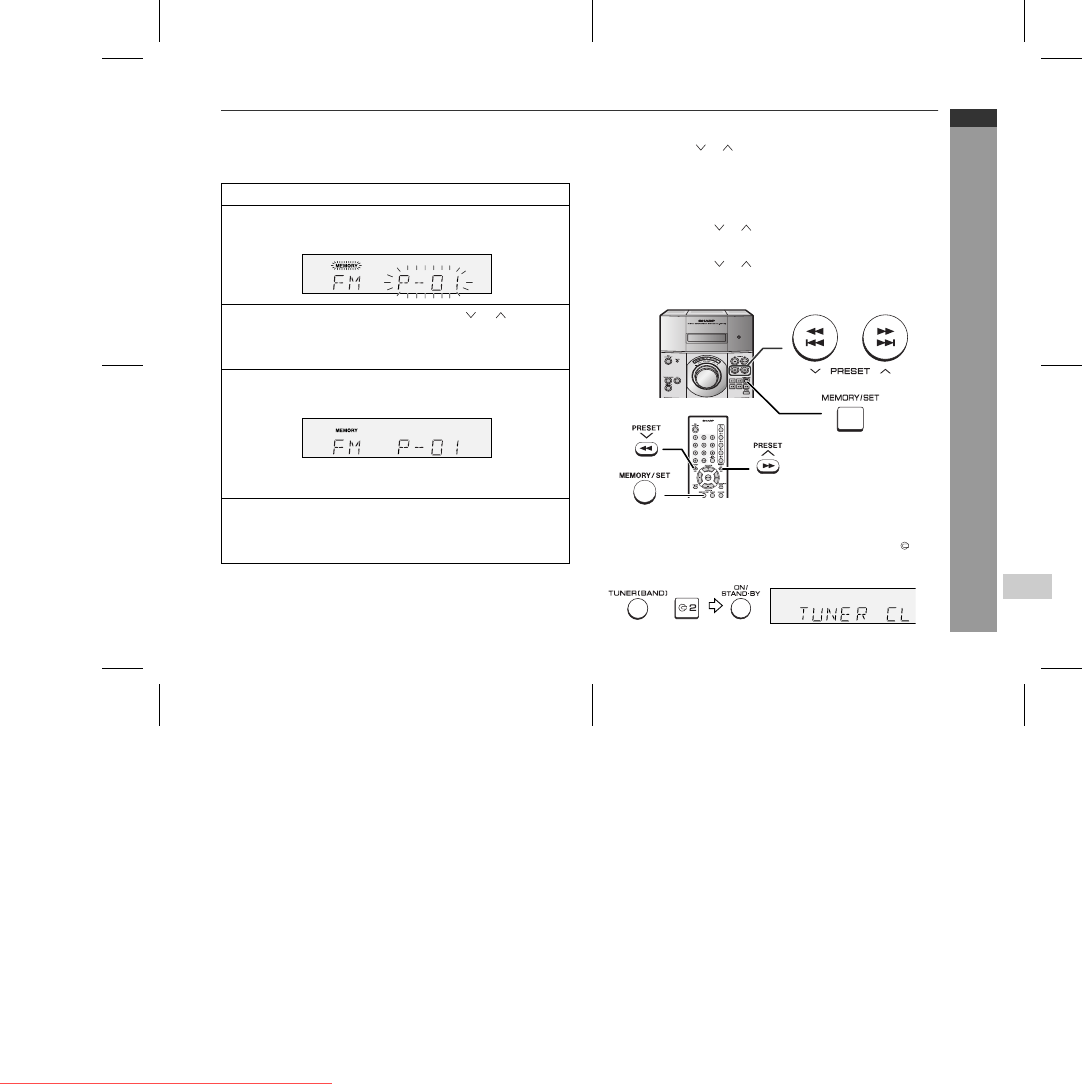
" Memorising a station
You can store 40 AM and FM stations in memory and recall them at
the push of a button. (Preset tuning)
Note:
The backup function protects the memorised stations for a few
hours should there be a power failure or the AC power lead get dis-
connected.
" To recall a memorised station
" To scan the preset stations
The stations saved in memory can be scanned automatically. (Pre-
set memory scan)
" To erase entire preset memory
1 Perform steps 1 - 3 in "Tuning" on page 21.
2 Press the MEMORY/SET button to enter the preset tuning
saving mode.
3 Within 30 seconds, press the PRESET ( or ) button to
select the preset channel number.
Store the stations in memory, in order, starting with preset
channel 1.
4 Within 30 seconds, press the MEMORY/SET button to store
that station in memory.
If the "MEMORY" and preset number indicators go out before
the station is memorised, repeat the operation from step 2.
5 Repeat steps 1 - 4 to set other stations, or to change a pre-
set station.
When a new station is stored in memory, the station previously
memorised will be erased.
Press the PRESET ( or ) button for less than 0.5 seconds to se-
lect the desired station.
1 Press the PRESET ( or ) button for more than 0.5 seconds.
The preset number will flash and the programmed stations will be
tuned in sequentially, for 5 seconds each.
2 Press the PRESET ( or ) button again when the desired sta-
tion is located.
1 Press the ON/STAND-BY button to enter the stand-by mode.
2 Whilst pressing down the TUNER (BAND) button and the 2 but-
ton, press the ON/STAND-BY button until "TUNER CL" appears.
Downloaded from www.Manualslib.com manuals search engine
Downloaded From Disc-Player.com Sharp Manuals
Przeglądanie stron 28
1 2 ... 24 25 26 27 28 29 30 31 32 33 34 ... 48 49

Komentarze do niniejszej Instrukcji

Brak uwag