Sharp VL-Z7S Dokumentacja Strona 94
- Strona / 122
- Spis treści
- ROZWIĄZYWANIE PROBLEMÓW
- BOOKMARKI

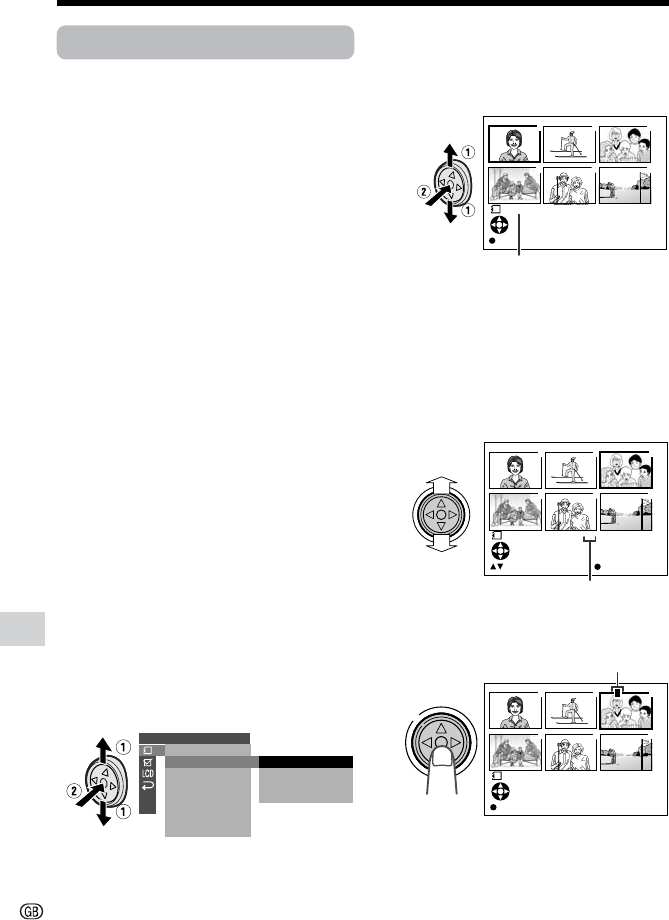
- MANUAL DE OPERAÇÃO 1
- OPERATION MANUAL 1
- Contents 4
- Advanced Features 5
- Supplied Accessories 7
- Optional Accessories 7
- Precautions 8
- Dew Formation 9
- 4 Remove the cleaning tape 10
- Operation References 11
- Right view 13
- Warning Indicators 14
- Preparation 16
- 3 Take the battery pack out 17
- • The POWER/CHARGE (RED) 19
- Inserting 21
- Removing 21
- About the write-protect 21
- Installing the Battery to 23
- Remote Control 23
- Changing to the 12-hour 25
- Time Mode 25
- Using the Viewfinder 27
- 2 Hold down the Lock 27
- Detaching the Lens 27
- Using the LCD 29
- 3 Hold down the Lock 29
- Tips on Recording 30
- Positions 30
- Basic Operations 31
- AU T OAUTO 32
- To pause recording 33
- To turn the power off 33
- Power Standby Mode 34
- Turning on/off the 34
- Backlight 34
- Auto Focus 35
- Macro Shots 35
- Remaining Battery 36
- Power Display 36
- Remaining Recording 36
- Time Display 36
- Playback 38
- PHONES VOL 39
- L-AUDIO-R(MONO) 40
- Useful Features 41
- DGTL ZOOM 42
- 3 0 min3 0 min 44
- BLC / GAI N ON 45
- Camera Recording 46
- To cancel DIS function 49
- Self Recording 50
- 3 Set the Power switch to v 50
- 4 Begin recording 50
- Self recording with reversed 51
- To return to normal screen 52
- Recording in LP (Long 53
- Play Recording) Mode 53
- Using the Zoom 54
- Microphone (Optional 54
- Accessory) 54
- TELEZOOM MIC 55
- Tape Playback 58
- Functions with the 58
- 1 During Tape Playback, press 58
- 2 Press the h (or j) 58
- DATE DISP. DATE 59
- PIC. EFFECT 60
- ROT AT E PB 61
- LOCK MODE 65
- HITE BAL 65
- Example of use 67
- SCENE MENU 69
- VIDEO AUDIO 71
- (L/MONO) 71
- L-AUDIO-R 72
- To Record from an External 73
- Editing with the DV 74
- Terminal (IEEE1394) 74
- To Record from Video Equip 75
- 12-bit audio recording 78
- 16-bit audio recording 78
- If you wish to change the 79
- Audio Dubbing 79
- Digital Still Camera Features 81
- 1280 960 82
- Selecting the Flash 84
- CORREC TRED EYE 85
- Recording with the 86
- Self-timer 86
- Playback Zoom 90
- To cancel the protection 91
- Deleting All Stored Images 93
- Assigning Print Order to All 95
- 1 Turn on the PC 96
- To USB terminal 97
- USB cable (supplied) 97
- 100SHARP 98
- DVC00001.JPG 98
- DVC00002.JPG 98
- To stop slide show playback 99
- Appendix 100
- BACKL IGHT 101
- Setting the 103
- Camcorder to 103
- Factory Presettings 103
- Useful Information 105
- SD\ Memory Card and 107
- MultiMediaCard\ 107
- Removable Storage Care 107
- AC Adapter 109
- Replacing the Fluorescent 109
- Cleaning 109
- Troubleshooting 111
- Specifications 115
- On-screen Display Index 116
- Tape Playback mode 117
- Card Playback mode 119
- SHARP CORPORATION 122
Powiązane produkty i podręczniki dla Kamery Sharp VL-Z7S
 (76 strony)
(120 strony)
(117 strony)
 (120 strony)
(449 strony)
(128 strony)
 (72 strony)
 (96 strony)
(92 strony)
(129 strony)
 (88 strony)
(71 strony)
(60 strony)
(120 strony)
 (133 strony)
(128 strony)
(96 strony)
 (80 strony)
(124 strony)
 (132 strony)
Whirlpool DFG 050 (AG) manuales
Manuales del propietario y guías del usuario para No Whirlpool DFG 050 (AG).
Ofrecemos 1 manuales en pdf Whirlpool DFG 050 (AG) para descargar gratis por tipos de documentos: Instrucciones de uso
Whirlpool DFG 050 (AG) Instrucciones de uso (12 paginas)
Marca: Whirlpool | Categoria: No info | Tamaño: 0.45 MB |
Tabla de contenidos
Más productos y manuales para No Whirlpool
| Modelos | Tipo de documento |
|---|---|
| CVT 146 |
Instrucciones de uso
Whirlpool CVT 146 Benutzerhandbuch,
10 paginas
|
| F080796 |
Guia Energética
 Document 9784224 [de] ,
1 paginas |
| LPA59EI/SL |
Instrucciones de uso
Istruzioni per l`uso,
8 paginas
|
| KRDD 9010 |
Instrucciones de uso
Istruzioni per l`uso,
12 paginas
|
| 5KPEXTA | Instrucciones de uso Whirlpool 5KPEXTA Brugermanual, 15 paginas |
| F086564 |
Guia Energética
Document 9791095,
1 paginas
|
| F084674 |
Guia Energética
Document 9784719,
1 paginas
|
| F077833 |
Guia Energética
Document 9779194,
1 paginas
|
| IWD 6105 (EU) |
Instrucciones de uso
Whirlpool IWD 6105 (EU) Manual de usuario,
24 paginas
|
| BC 312 AAI |
Instrucciones de uso
 Whirlpool BC 312 AAI User manual,
40 paginas |
| IDCA 735 B (EU) |
Instrucciones de uso
 Whirlpool IDCA 735 B (EU) Manuel utilisateur,
68 paginas |
| IWDC 6125 C ECO (IT) |
Instrucciones de uso
Whirlpool IWDC 6125 C ECO (IT) Manuale utente,
12 paginas
|
| 5CO |
Instrucciones de uso
Whirlpool 5CO Benutzerhandbuch,
6 paginas
|
| TGA 281/A+ |
Manual de instalación
ISTRUZIONI PER L`USO,
4 paginas
|
| KOHCS 60600 |
Instrucciones de uso
Istruzioni per l`uso,
28 paginas
|
| KMPG 3610 IX |
Instrucciones de uso
Istruzioni per l`uso,
32 paginas
|
| C 3V P6 (W) R /HA |
Instrucciones de uso
Whirlpool C 3V P6 (W) R /HA Benutzerhandbuch,
15 paginas
|
| 5CO |
Instrucciones de uso
Whirlpool 5CO Manuel utilisateur,
6 paginas
|
| 5KN1PS |
Instrucciones de uso
Whirlpool 5KN1PS Manuel utilisateur,
6 paginas
|
| TIAA 12 (1) |
Instrucciones de uso
 Whirlpool TIAA 12 (1) Manuel utilisateur,
60 paginas |
© 2020, manymanuals.pl. Wszelkie prawa zastrzeżone. | 0.046 s |
 Manymanuals.com
 Manymanuals.de
 Manymanuals.fr
 Manymanuals.it
 Manymanuals.pl
 Manymanuals.cz
 Manymanuals.es
 Manymanuals-pt.com
Komentarze do niniejszej Instrukcji